Printing headers and footers
The header and footer are printed at the top and bottom of the page, in accordance with the margins set via the "Page setup" option in the "File" menu.
The bottom header is printed immediately after the top header, with no space between them.
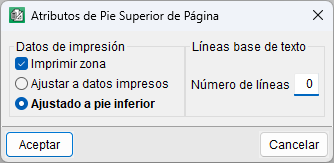
For the top footer, you can define its position in two ways:
- Adjust to printed data. It appears immediately after the last printed data in the body of the report, so there may be a blank space between it and the bottom footer.
- Adjusted to bottom footer. This is positioned immediately above the lower footer, remaining fixed in relation to it.