Template scripts
Scripts enable logic and automation to be incorporated into templates using the program’s own programming language. Whilst many reports can be designed without them, others need them to perform analyses, modify variables, display messages, control printing or define customised behaviour.
A report template may contain the following types of scripts:
- Initialisation script
Only one can be defined per template. It runs just before the report is printed. - Script 'Upon loading'
This can be defined for each record section. It runs after the data for each record has been loaded and before it is printed using the section fields. - Script 'Before printing'
It can be defined for each section of the template. It runs immediately before each instance of the section is printed and can be used to prepare the variables used by its objects, along with other operations. - Script 'After printing'
It can be defined for each area of the template. It runs immediately after its content is printed and can be used to update variables used by the page mask objects, along with other operations.
Script editor
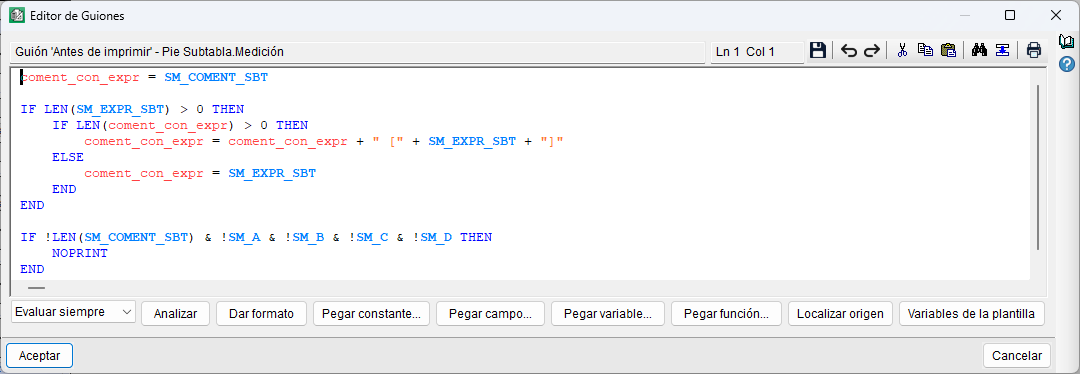
The Script editor lets you define and modify the script content in the template. At the top, it shows the type of script being edited and the section or area to which it belongs.
As well as the usual editing tools, it offers the following options:
- Script evaluation. Specify whether the script should be evaluated whilst the report is being generated. The available options include "Always evaluate", "Evaluate if visible" and "Do not evaluate". The latter option lets you keep the defined script without it being executed.
- Analyse. Check the script’s syntax for any errors.
- Provide format. Format the code to make it easier to read.
- Paste constant. Select and insert a constant at the current cursor position.
- Paste field. Select and insert an available record field at the current cursor position.
- Paste variable. Select and insert an available variable at the current cursor position.
- Paste function. Select and insert a scripting language function at the current cursor position.
- Locate origin. Trace the origin of an element used in the script.
- Template variables. Access the variables defined in the template.
In addition, the top toolbar includes tools for saving, undoing and redoing, cutting, copying, pasting, searching and replacing, amongst other editing functions.
Variables used in scripts
Scripts can use different types of variables to store and manipulate information whilst they are running. In addition to template variables and storable variables, internal variables – used for intermediate calculations within a script – and dynamic variables – which are based on internal variables and allow values to be retained and shared across different executions and scripts – can also be used. User variables can also be used; their values are stored in the database and can be used in expressions associated with calculated user columns.
| More information: |
|---|
| By clicking the "Show detailed information…" option, located in the top right-hand corner of the Script Editor, you can access help on the language and syntax of report template scripts. This information includes operators, constants, variables, arrays, procedures and functions available for defining scripts. |
External script
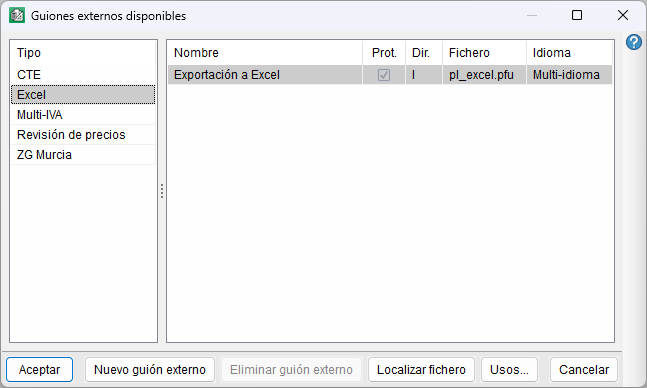
As well as the scripts defined directly in the template, the template can use an external script.
External scripts are sorted by type and can be used by different templates.
These scripts are managed via the "External script" option in the "Data" menu. If the template does not have a script associated with it, the program allows you to select one from the available external scripts or create a new one. It also lets you manage existing external scripts, locate their files and view the templates in which they are used.