Variables
Variables let you store and use additional information whilst generating a report.
Most of the information used by a template is obtained directly from the fields in the record templates. However, variables let you work with data that does not come directly from these fields; for example, to store partial results, perform analyses, control certain actions using scripts, or collect information entered via dialog boxes.
Variables can be used in various parts of the template, such as alphanumeric objects, captions and dialog boxes. However, they do not need to be linked to a template object, as they can also be used internally to perform analyses or control how the report works.
The Report Template Editor lets you work with template variables and storable variables.
| Note: |
|---|
| Record fields provide information from the record templates and cannot be modified using scripts. Variables, on the other hand, can receive and modify values during report generation. Furthermore, storable variables allow their values to be retained in the database used to generate the report. |
Template variables
Template variables are defined and stored within the template itself. They can be managed via the "Template variables" option in the "Data" menu.
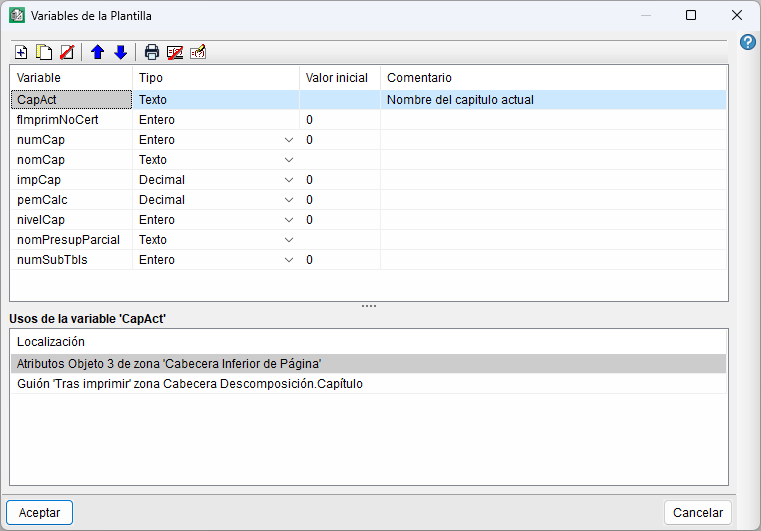
Each variable is defined by the following data:
- Name
Identify the variable uniquely. It may consist of letters without accents, numbers and the underscore character (_). It is not case-sensitive; therefore, for example,total,TotalandTOTALall refer to the same name. Nor may it coincide with the name of another variable, a record field, a function, a procedure or a reserved word in the scripting language. - Type
Determine the type of information that the variable can store. It can be a decimal number, an integer or text. - Initial value
Define the value that the variable initially holds until it is modified, for example, by a dash assignment statement. - Comment
Add a description to help identify the variable in the windows displaying the available variables.
The window also displays the uses of the selected variable, showing the objects and scripts in the template in which it is used. This lets you identify its dependencies before modifying or deleting it.
The defined variables can also be reordered using the next and previous buttons to make them easier to identify and locate.
Storable variables
Storable variables are used in scripts in a similar way to template variables, but with the difference that their values can be stored in the database used to generate the report. Thus, whilst template variables belong to a specific template, storable variables allow information associated with the database to be retained.
Storable variables are sorted into groups of storable variables, categorised by type. These groups can be used in different templates, although each template may use no more than one group.
Storable variables are managed via the "Storable variables" option in the "Data" menu. Access varies depending on whether the template has a group of storable variables associated with it.
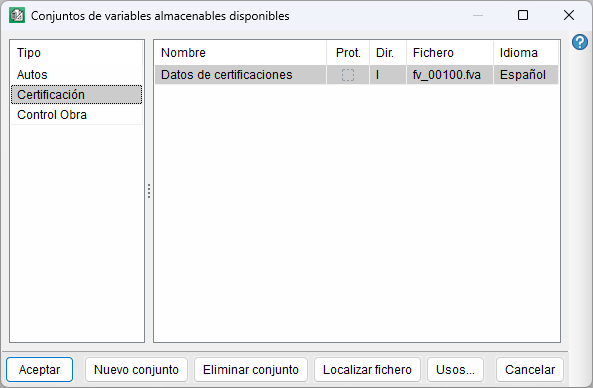
If the template does not have an associated group, the program allows you to select an existing one or create a new one. When you select this option, the "Available storable variable groups" window opens, from which you can select, create or delete groups, locate their files and view their uses.
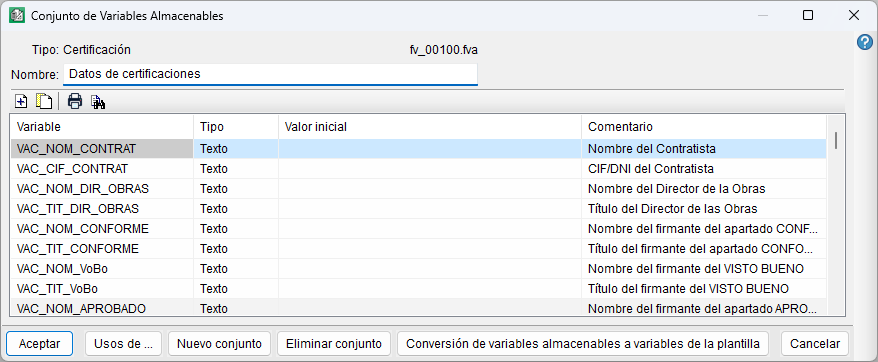
If the template already has an associated group, the "Storage Variable Group" window opens directly. This window displays the variables it contains, along with their type, initial value and comment, and lets you manage the variables in the group and view their uses.
Furthermore, the "Conversion of storage variables to template variables" option lets you convert the variables in the group into variables specific to the template.
| Best practice: |
|---|
To avoid conflicts with the names of record fields and template variables, we recommend that you use identifying prefixes in the names of storable variables. For example, for a set relating to certificates, you could use the prefix vac_, with names such as vac_certno or vac_lowcoeff. |