

Configuration of network hardlock
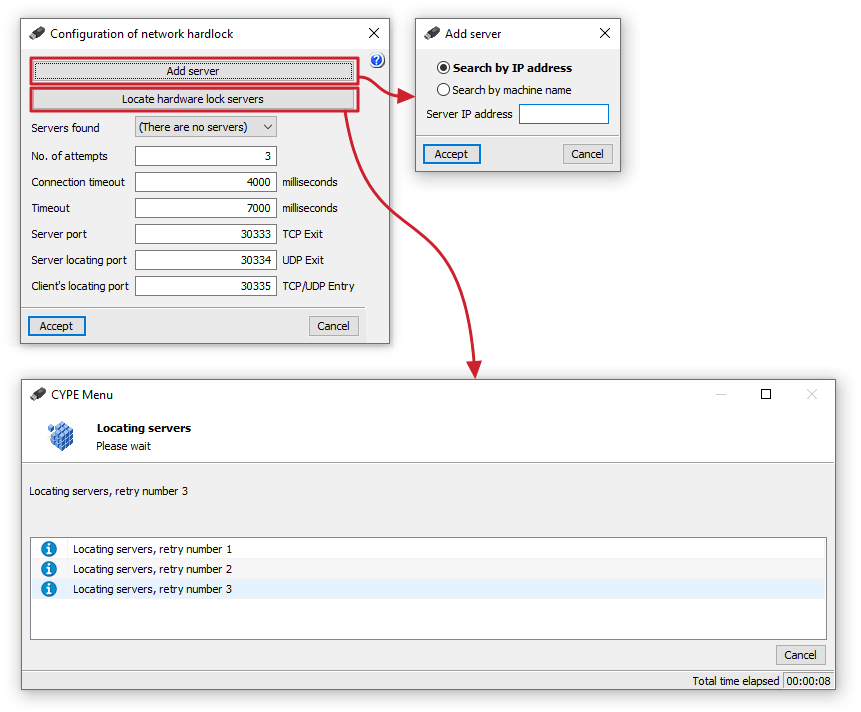
In the "Configuration of network hardlock" window, you can make the following settings to ensure a connection with the network hardlock, which provides the necessary authorisation for using the program:
- The "Add server" option allows you to specify the hardlock server address directly. You can "Search by IP address" (and enter the "Server IP address") or "Search by machine name" (and enter the "Server name").
- The "Locate hardware lock servers" option allows you to initiate a process to locate tablet servers on the network, up to a specified number of retries.
The following features are shown below:
- Servers found
This drop-down menu displays the IP addresses of the servers that have been added or found via automatic detection. - Number of retries (default: 3)
The number of times a client retries when searching for active servers. The higher the number of retries, the slower the search will be, but the greater the chance of finding all the servers. - Connection timeout (default: 4000 milliseconds)
The time, in milliseconds, that a client spends attempting to search for active servers. The longer this time, the slower the search will be, but the greater the chance of finding all the servers. - Timeout (default: 7000 milliseconds)
This value specifies the time, in milliseconds, that the client waits before assuming that the connection to the server has been lost. It may be useful to adjust this setting if there are network delays due to congestion or other reasons. - Server port (default: 30333 TCP Outbound)
This value specifies the communication port that programs will use to communicate with the hardlock server. - Server discovery port (default: 30334 UDP Outbound)
This value specifies the communication port that programs will use to discover the hardlock server. - Client port for discovery (default: 30335 TCP/UDP Inbound)
This value specifies the communication port that programs will use to discover the hardlock server.
| Note: |
|---|
| To connect to the server specified using the "Add server" option, you must ensure that the server is running and that its name or address has been entered correctly. If you have a router (router) or a firewall (firewall) on the network, you can try changing the port on the hardlock server, ensuring that you also change all hardlock clients so that they use the same port as the server. Furthermore, the value entered for each communication port must always match the setting configured on the hardlock server being used, and should only be changed if there is a compatibility issue with another installed program that uses the same communication port. If this value is changed, it must be modified both in the hardlock server configuration and in the configuration of all clients using that hardlock server. |
