Phase I: Preliminary analysis

Within the "Phase I: Preliminary analysis" section, the program allows you to enter "Geographical and economic data" and "Building data".
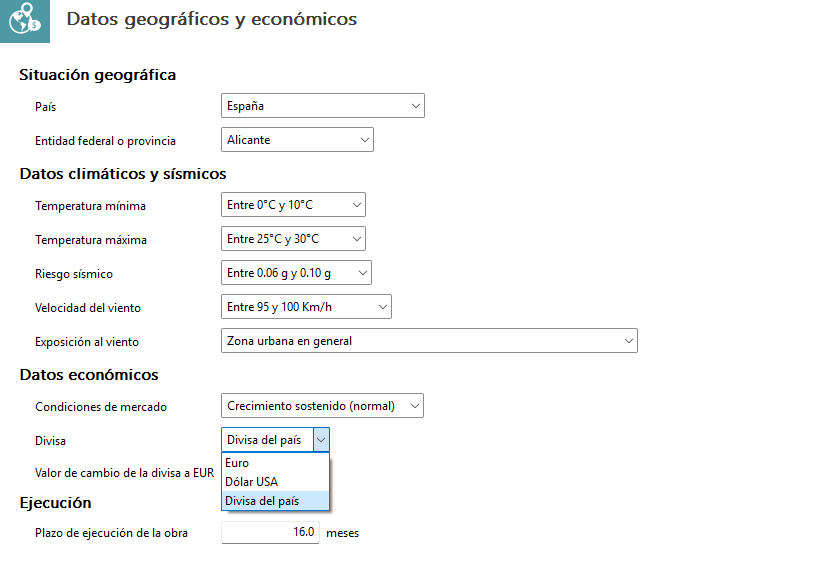
Geographical and economic data
The "Geographical location" section specifies the country and the federal state or province. You can choose from a wide range of countries, including Spain, the United States, France, Japan, Morocco, Portugal, Hong Kong, Malaysia, the United Kingdom and Ecuador, amongst others.
In the "Climate and seismic data" section, you can specify a range of minimum and maximum temperatures, seismic risks and wind speed, as well as the project’s degree of exposure to wind.
The "Economic data" section provides details of the property market situation. You can also choose the currency from "Euros", "US Dollars" or the "Country currency" specified in the "Country" section. If you select the "Country currency" option, the "Currency to EUR exchange rate" field will be filled in automatically. However, due to the volatility of some currencies, you have the option to adjust this value manually.
Finally, the "Execution" section provides an estimate of the number of months required for the planned duration of the works.
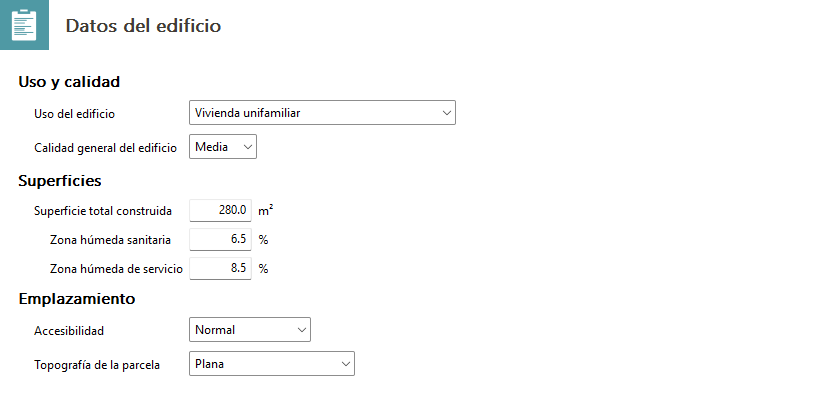
Building details
In the first section, "Use and quality", the building’s primary use must be specified; this may include residential, office, industrial, cultural, hospitality, healthcare, administrative or sports facilities, amongst others. The "General quality of the building" is also specified here, as costs can rise considerably depending on the range of materials used.
It is necessary to define the "Total floor area" by specifying the approximate percentage allocated to wet areas and that allocated to service wet areas.
Finally, you must specify the expected "Accessibility" for the project by selecting an option from the menu ranging from "Very good" to "High difficulty". You must also specify the type of plot, as its layout affects construction costs.