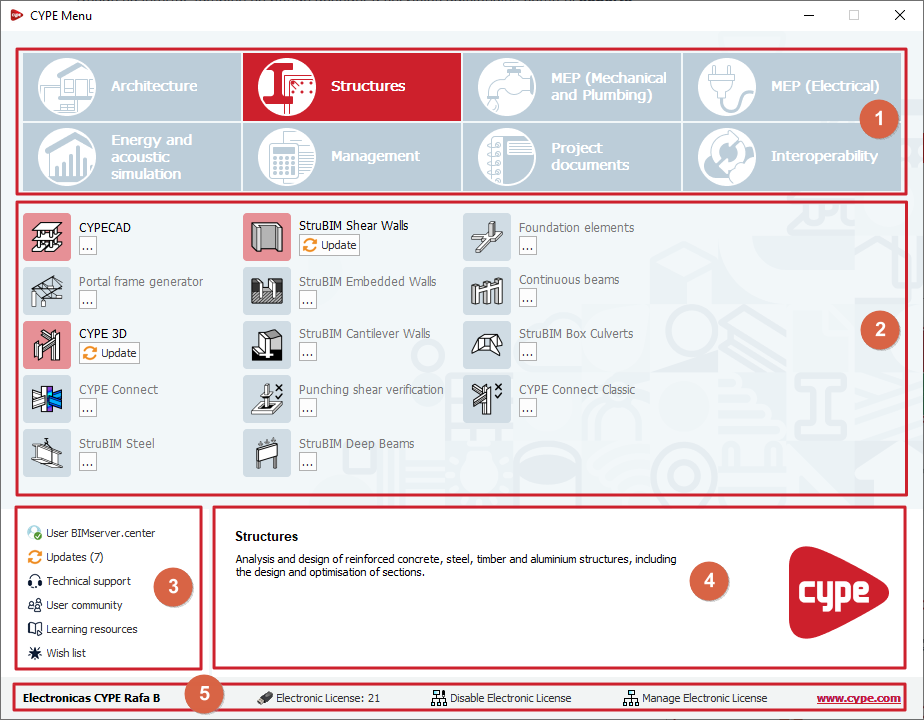
CYPE Menu interface
The CYPE Menu interface consists of a single panel containing the following options:
- At the top, there is a link to each group of programs. The selected program group will be highlighted in colour.
- In the centre is the list of apps belonging to the selected group of programs. Each of these apps can be installed and run individually from here.
- At the bottom left, there is a set of options that allow you to:
- log in to BIMserver.center,
- update the apps all at once,
- and access the technical support, the user community, the learning resources and the wish list.
- In the bottom-right corner, to the right of the options panel, an information text is displayed for the group of programs or the app over which the mouse pointer is hovering.
- Finally, the bottom bar displays the name of the current license holder and, further to the right, the number of the license currently in use (from where you can view your permissions), the controls for using or releasing the electronic license, and for managing the electronic license, as well as a link to access the CYPE website.