

Editing longitudinal sections
In the "Longitudinal" menu at the top of the program interface, you will find the following option:

Modify dimensions in the longitudinal section
This allows you to modify the elevation levels of the installation graphically, displaying the longitudinal section of the selected spans.
To use this option, you must have entered the geometry of the network spans on the plan view and assigned the discharge point. Clicking a span opens a window showing the span's longitudinal section and the spans that follow it up to the discharge point.
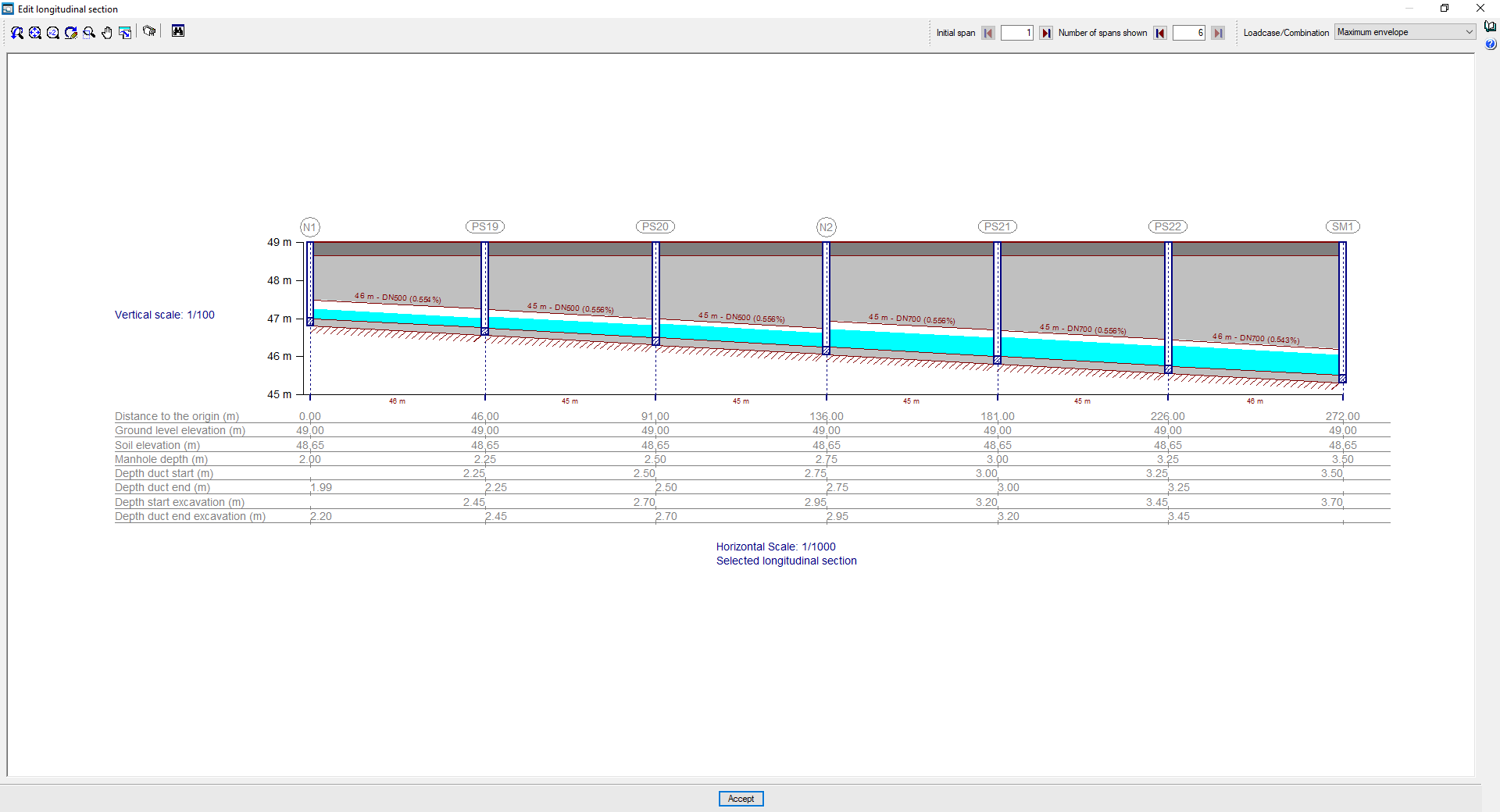
In the longitudinal section view, you can configure the "Initial span" and the "Number of spans displayed" up to the discharge point you wish to view using the options at the top. By default, the first section to be displayed will be the one marked on the plan view in the main interface, and the subsequent sections will show the route to the discharge point.
In the "Loadcase/Combination" selector, you can adjust the display of the water table for different combinations or envelopes.
In the longitudinal section itself, clicking on the sections directly changes the "Slope of the span". When the new slope is set, the program calculates the depth of the manhole located at the end of the modified span.
In addition, the following changes can be made:
- By clicking the scaling options ("Horizontal scale" and "Vertical scale"), you can change the section's horizontal and vertical display scales.
- By clicking on the text at the bottom, you can change the "Longitudinal section name".
In the top-left corner, the program provides tools for printing the "Drawings" associated with the selected longitudinal section (both the site plan showing its position and the longitudinal section plan), as well as for viewing its position on the network via a "Map".
In the information panel at the bottom of the timeline, you can view or edit the following data for each node. The cursor changes when you hover over the data you wish to edit, indicating that it is editable:
- Distance to the origin:
The horizontal distance from the well to the origin of the first span of the longitudinal section shown. - Ground level elevation (editable)
Level of the finished ground level elevation. - Soil elevation (editable)
Modified soil elevation, excluding the thickness of the road surface. - Manhole depth (editable)
The depth of the manhole, measured from ground level. - Depth duct start (editable)
The depth of the lower edge of the inner surface of the inlet duct to the shaft, measured from ground level. - Depth duct end (editable)
Depth of the lower edge of the inner surface of the manhole’s outlet conduit, measured from ground level. - Depth start excavation
The depth of the excavated ground at the entrance to the shaft, measured from the ground level elevation. - Depth duct end excavation
The depth of the excavated ground at the well outlet, measured from the ground level elevation.
