Inserting foundation elements (footings and pile caps)
Foundation elements can be entered via the “Beam input” and “Results” tabs. The option will be available when you are in a group where a column or wall defined as “With external connection” begins, or a wall with a strip footing or a “Fixity” at its base. To move to the desired group, use the “Move up group”, “Go to group” and “Move down group” options.
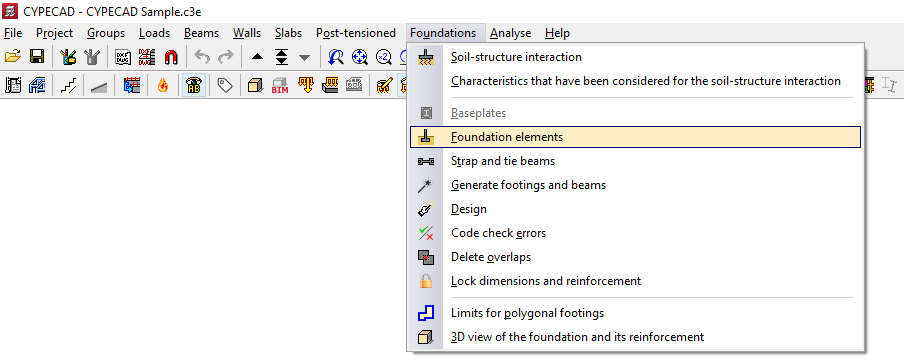
To insert a foundation element, open the “Foundation” menu at the top and select the “Foundation elements” option.
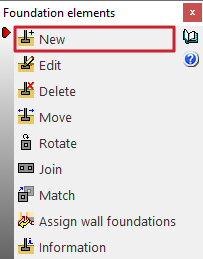
This opens the "Foundation elements" window, which displays the following options:
- New
- Edit
- Delete
- Move
- Rotate
- Join
- Match
- Assign wall foundations
- Information
To add a new foundation element, click on "New".
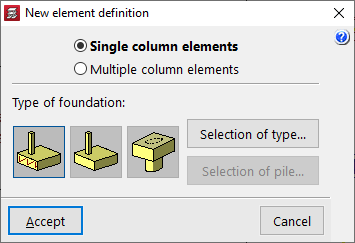
Defining a new foundation element
In the window that appears, you must first select "Single-column elements" if it is an isolated foundation element, or "Multi-column elements" if it is a combined foundation element or one shared by several columns.
In the "Type of foundation" section, choose from the following options:
- Reinforced concrete footing
- Mass concrete footing
- Pile cap
Selecting the type of footing
If you select a reinforced concrete footing or a plain concrete footing, under "Selection of type" you must specify whether it is square, rectangular or pyramidal, and whether it is centred or off-centre:
- Square footing
- Centred rectangular footing
- Eccentric rectangular footing
- Centred rectangular footing
- Tapered centred rectangular footing
- Tapered eccentric rectangular footing
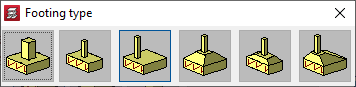
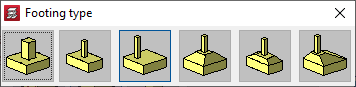
Selecting the type of pile cap
If you select a cluster, the "Selection of type" option allows you to define between one and seven pile caps, in rectangular, pentagonal or hexagonal shapes, as well as to use linear or rectangular clusters with a number of pile caps to be specified along the X and Y axes.
- Pile cap for 1 pile
- Pile cap for 2 piles
- Pile cap for 3 piles
- Pile cap for 4 piles
- Strip pile cap
- Rectangular pile cap
- Rectangular pile cap for 5 piles
- Pentagonal pile cap for 5 piles
- Pentagonal pile cap for 6 piles
- Pentagonal pile cap for 6 piles
- Hexagonal pile cap for 7 piles

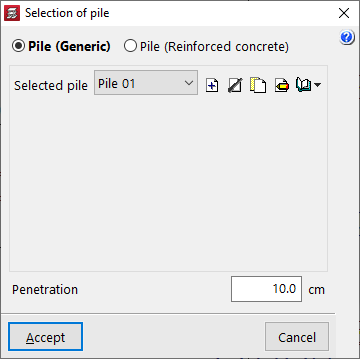
Selecting piles
If you select a pile cap, after clicking "Select pile", you can choose either a generic pile or a reinforced concrete pile:
- Generic pile
In this case, the general characteristics of the piles will be defined solely for the purpose of analysing the pile cap. - Pile (Reinforced concrete)
This option allows you to analyse, verify, and design piles as reinforced concrete elements, as well as analyse the pile cap.