


Inserting loads at the head of columns
The "Head loads" option, available in the "Input" and "Columns, shear walls and starts" menus, in the "Column input" tab, allows you to enter loads (axial, moments, shear and torsional) both at the column bases and at the column heads on the top floor.
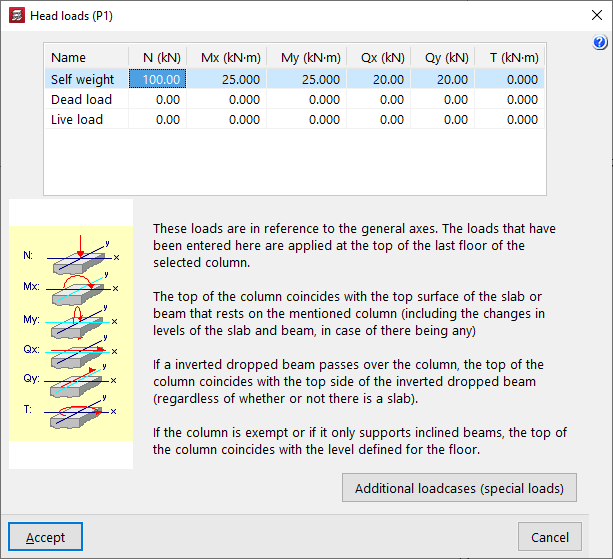
After clicking on the option, you must then select a start or a column. This opens the "Head loads" window.
This window displays a list at the top where you can define the loads to be applied to the base or top of the column for each of the available loadcases and in the specified units. The different columns allow you to enter the axial force ("N"), the bending moments ("Mx", "My") and shear forces ("Qx", "Qy") in both directions, and the torsional moment ("T").
The "Additional loadcases (special loads)" button at the bottom allows direct access to the panel for creating and editing the loadcases for the structure.
The loads refer to general axes of the structure, and the sign criteria are those indicated in the legend visible on the left side of the window.
| Note: |
|---|
| The loads defined here are applied at the head of the top floor of the selected column. The head of the column coincides with the upper face of the floor slab or beam that rests on that column, including any unevenness in the floor slab and beam, if any. If an inverted hanging beam passes through the column, the column head coincides with the upper face of the inverted hanging beam, regardless of whether there is a floor slab or not. If the column is free-standing or if only inclined beams rest on it, the top of the column coincides with the defined floor level. |
