Selecting and editing generic piles
To create a generic pile, select “Generic pile” in the “Pile selection” window and, in “Selected pile”, click “Create”.
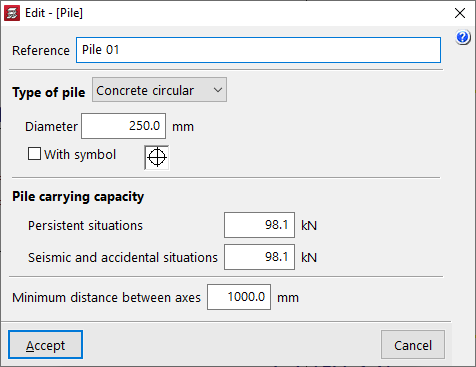
In the window that appears, you define the “Reference”, the “Type of pile” (either “Concrete circular” or “Concrete square”) along with its “Diameter” or “Width”, and the symbol used for it.
The “Pile carrying capacity” is the maximum design axial load that the pile can withstand at its head, and this value must be provided by the user. The program will issue a warning if this value is exceeded, following the distribution of forces analysed in the pile cap. This value must be defined for “Persistent situations” and for “Seismic and accidental situations”.
In addition, the “Minimum distance between axes” is defined, which specifies the minimum distance that must exist between the centres of adjacent piles.
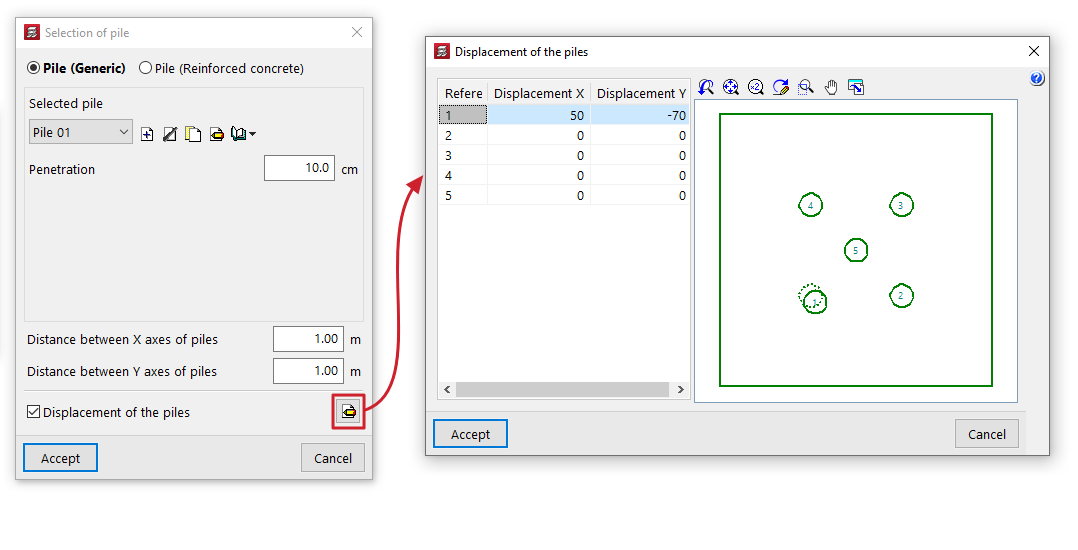
After clicking "Accept", back in the "Pile selection" window, the "Penetration" field indicates the length of the pile that penetrates the timber pile.
| Note: |
|---|
| The pile should penetrate the timber pile to a depth of between 10 and 15 centimetres. |
The “Distance between pile axes” is also shown, if rectangular or linear pile groups have been selected, the “Number of piles”.
The “Displacement of the piles” option appears in some types of pile foundations and allows you to apply an “Displacement X” and a “Displacement Y” to each pile, to make minor adjustments to their position.