Entering direct expansion systems (multisplit and split 1x1)
Within the "Installation" tab, in the "Multisplit" and "Split" menus of the "Direct expansion" group in the main toolbar, there are options for defining and entering the elements of the multisplit and split 1x1 direct expansion systems covered by the program:

- Multisplit
- Outdoor multi-split unit
- Indoor unit, wall-mounted
- Indoor unit, with distribution using ducts
- Split
- Outdoor 1x1 unit
- Indoor 1x1 unit
The following systems are available:
Direct expansion multi-split system
This system consists of an outdoor unit connected to several indoor units.
Outdoor unit (multisplit)
The option to enter the outdoor unit of a multi-split direct expansion system is as follows:
- Multi-split outdoor unit
When entering an outdoor unit for a multi-split system, the following parameters must be specified:
- Reference
- Catalogue / Series / Selection
Selects and imports data from manufacturer catalogues previously uploaded using the "Catalogue management" option. - 3D model
3D view of the selected unit. - Nominal heating capacity / Nominal cooling capacity / Connected indoor units / Refrigerant
Nominal power ratings, connected indoor units, and refrigerant type of the selected unit.

Indoor units (multisplit)
The options for installing indoor units in multi-split systems are as follows:
- Multi-split indoor unit, wall-mounted
- Multi-split indoor unit, with duct distribution
When entering an indoor unit for a multi-split system, the following parameters must be specified:
- Reference
- Catalogue / Series / Selection
Selects and imports data from previously loaded manufacturer catalogues using the"Catalogue management" option. - 3D model
3D view of the selected unit. - Nominal heating capacity / Nominal cooling capacity / Capacity index
Properties of the selected unit. - Design conditions
- Power required (Cooling/Heating) (optional)
- Indoor dry bulb temperature (Cooling/Heating) (optional)
- Indoor wet bulb temperature (Cooling) (optional)
- Assigned thermal loads
Defines the following percentages on the values of the thermal loads for heating and/or cooling of the project. The program automatically assigns loads according to the layout of the terminal elements in the model.- % Assigned heating capacity
- % Assigned total cooling capacity
- % Assigned sensible cooling capacity
- % Required heating load
- % Required total cooling load
- % Required sensible cooling load

Direct expansion split system 1x1
This system consists of an outdoor unit and an indoor unit.
The options for installing the outdoor unit and indoor unit of a 1x1 direct expansion split system are as follows:
- 1x1 outdoor unit
- 1x1 indoor unit
When entering an outdoor unit for a 1x1 split system, only the following parameter needs to be specified:
- Reference
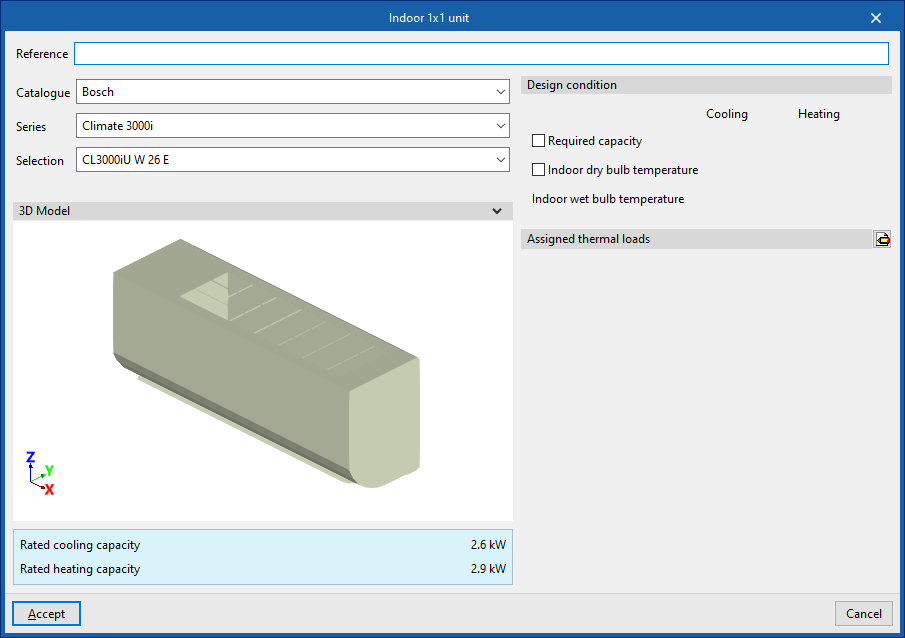
When entering an indoor unit for a 1x1 split system, the following parameters must be specified:
- Reference
- Catalogue / Series / Selection
Selects and imports data from previously loaded manufacturer catalogues using the"Catalogue management" option. - 3D model
3D view of the selected unit. - Nominal heating capacity / Nominal cooling capacity
Properties of the selected unit. - Design conditions
- Power required (Cooling/Heating) (optional)
- Indoor dry bulb temperature (Cooling/Heating) (optional)
- Indoor wet bulb temperature (Cooling) (optional)
- Assigned thermal loads
Defines the following percentages on the values of the thermal loads for heating and/or cooling of the project. The program automatically assigns loads according to the layout of the terminal elements in the model.- % Assigned heating capacity
- % Assigned total cooling capacity
- % Assigned sensible cooling capacity
- % Required heating load
- % Required total cooling load
- % Required sensible cooling load