

Edge processing
The analysis of linear thermal bridges enables the corresponding linear thermal transmittances to be calculated based on the characteristics of the construction systems adopted. This analysis is carried out taking into account the applicable specifications in accordance with the standard selected for calculating the thermal transmittance of linear thermal bridges.
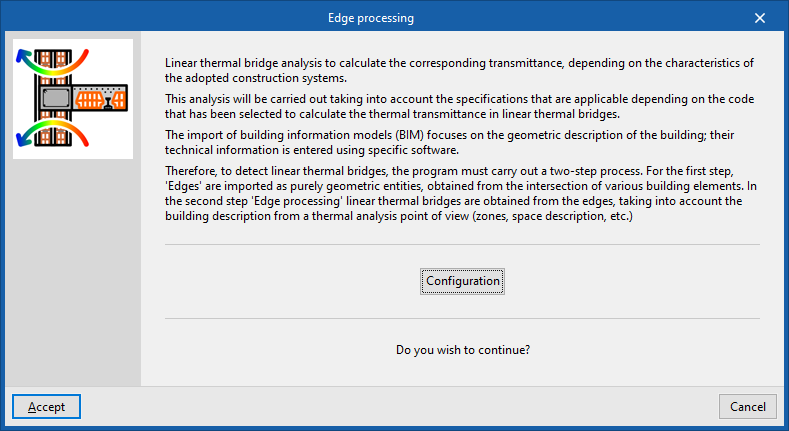
The model imported during the process of creating a new project or added via the "3D Model" tab focuses on the geometric description of the building. The technical information is entered into the building’s thermal model. Therefore, to detect linear thermal bridges, the program carries out a two-stage process:
| Note: |
|---|
| The IFC4 standard does not cover the concept of linear thermal bridges. CYPE has therefore created an entity so that, when an IFC4 file generated by software such as IFC Builder or Open BIM Analytical Model is imported, the intersections of the structural elements (edges) can be displayed for subsequent processing in CYPETHERM. |
- In the first stage, the building’s edges are imported as purely geometric entities, derived from the intersection of various structural elements. This is done either by generating the building model during the import process of a BIM model containing this information, as found in the BIMserver.center project, or by generating the geometric model from the "3D Model" tab. At this stage, the "Linear thermal bridges" library in the "Building" tab contains all the building’s edges as geometric entities derived from the intersection of the various structural elements. Some of these edges may give rise to linear thermal bridges, so a second step is required.
- In the second stage, through edge processing, linear thermal bridges are identified on the basis of the edges and in accordance with the building’s thermal analysis specifications (zoning, description of spaces, etc.). The program analyses the building and identifies the geometric edges that lie between a habitable space and the exterior, and between a habitable space and a non-habitable space. Not all edges necessarily result in linear thermal bridges.
This process can be carried out at the start of a project and when importing a project, or alternatively by clicking on the "Edge processing" option in the "Thermal bridges" section of the top toolbar on the "Building" tab. To use this tool, the building must be defined without any errors:

When you accept the "Edge processing" window, the program modifies the data relating to "Linear thermal bridges" in the side tree of the "Building" tab, both in the library and in relation to the linear thermal bridges assigned to each room in the tree structure that appears when the "Zones" level is selected. This generates the necessary types and adjusts the linear thermal transmittance value and the category associated with each of the linear thermal bridges.
Edge processing settings
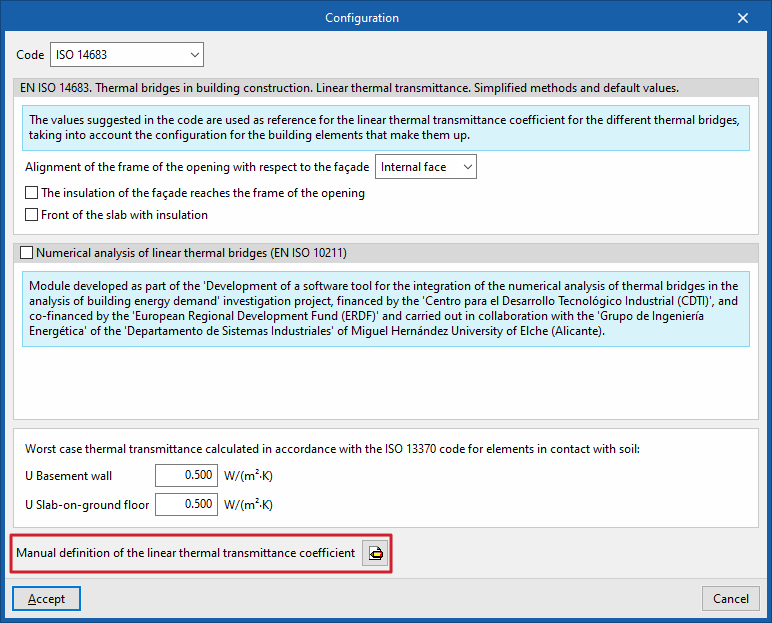
The program analyses the building by identifying the geometric boundaries between a habitable space and the exterior, and between a habitable space and a non-habitable space. Using the configuration options, the characteristics of the main construction systems are selected so that the corresponding thermal transmittances can be calculated.
To do this, in the "Edge processing" window that appears when you select the option of the same name, click on "Settings". This option lets you adjust the following edge processing parameters:
- Code
- Numerical analysis of linear thermal bridges (EN ISO 10211) (optional)
- Manual definition of the linear thermal transmittance coefficient
The effects of configuring these sets of parameters are detailed below.
Selecting a code
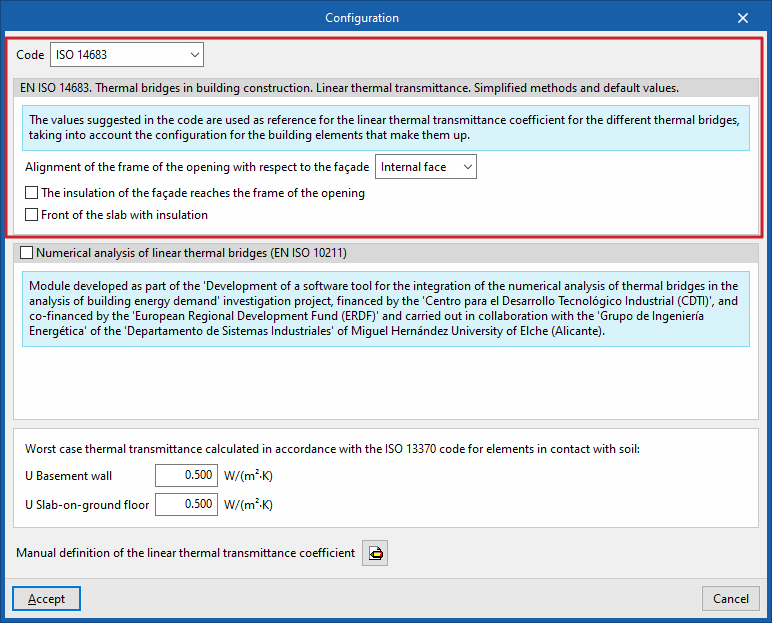
The "Code" drop-down menu lets you select the reference standard for edge processing. The available standards include the following:
ISO 14683
The following standard may be used as a reference: EN ISO 14683. Thermal bridges in building construction. Linear thermal transmittance. Simplified methods and default values.
The values proposed in this standard for the linear thermal transmittance of the various thermal bridges are used as a reference, taking into account the configuration of the structural elements that make up the thermal bridge.
The options available under this standard are as follows:
- Alignment of the frame of the opening with respect to the façade (Internal face / Centred / External face)
- The insulation of the building envelope extends to the frame of the opening (optional)
- Insulated floor slab face (optional)
ISO 14683 (Italy)
The following standard may be used as a reference: UNI EN ISO 14683. Thermal bridges in buildings. Linear thermal transmittance. Simplified methods and default values.
The options available under this standard are as follows:
- Alignment of the frame of the opening with respect to the façade (Internal face / Centred / External face)
- The insulation of the building envelope extends to the frame of the opening (optional)
- Insulated floor slab face (optional)
DA DB-HE/3 (Spain)
Please use the following standard as a reference: CTE DB HE1. Thermal Bridge Atlas DA DB-HE/3.
The supporting document for the DB-HE Basic Document "Energy Saving" (DA DB-HE / 3) sets out approximate values for linear thermal transmittance for the most common construction systems.
The options available under this standard are as follows:
- Alignment of the frame of the opening with respect to the façade (Internal face / Centred / External face)
- The insulation of the building envelope extends to the frame of the opening (optional)
- Insulated floor slab face (optional)
Th-Bât regulations (France)
Please use the following standard as a reference: Règles Th-Bât. (Booklets 1 and 5).
SCE Manual (Portugal)
Please use the following standard as a reference: SCE. Energy Performance of Residential Buildings.
The options available under this standard are as follows:
- The insulation of the building envelope extends to the frame of the opening (optional)
Numerical analysis of linear thermal bridges (EN ISO 10211)
This section determines the thermal transmittance of linear thermal bridges by solving and post-processing a finite element heat transfer analysis model, based on EN ISO 10211.
This module has been developed as part of the research project "Development of a software tool for integrating the numerical analysis of thermal bridges into the calculation of energy demand in buildings", funded by the Centre for Industrial Technological Development (CDTI), co-funded by the European Regional Development Fund (ERDF), and carried out in collaboration with the Energy Engineering Group of the Department of Industrial Systems at Miguel Hernández University in Elche (Alicante).
| Note: |
|---|
| This feature is identical to that offered by the standalone CYPETHERM BRIDGES app. |
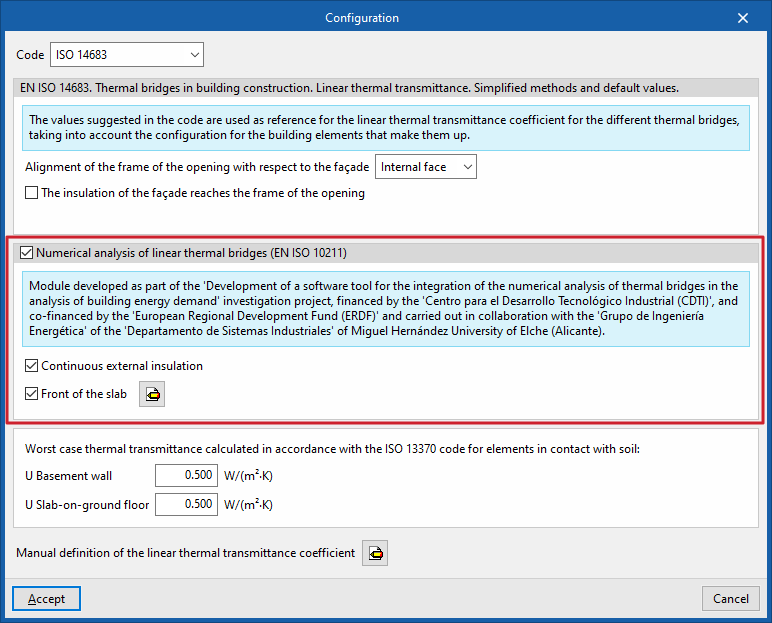
The options available in this section are as follows:
- Continuous external insulation (optional)
- Slab face (optional)
Define the material layers of the slab face by entering their technical characteristics, such as thickness, thermal conductivity, thermal resistance, density and specific heat.
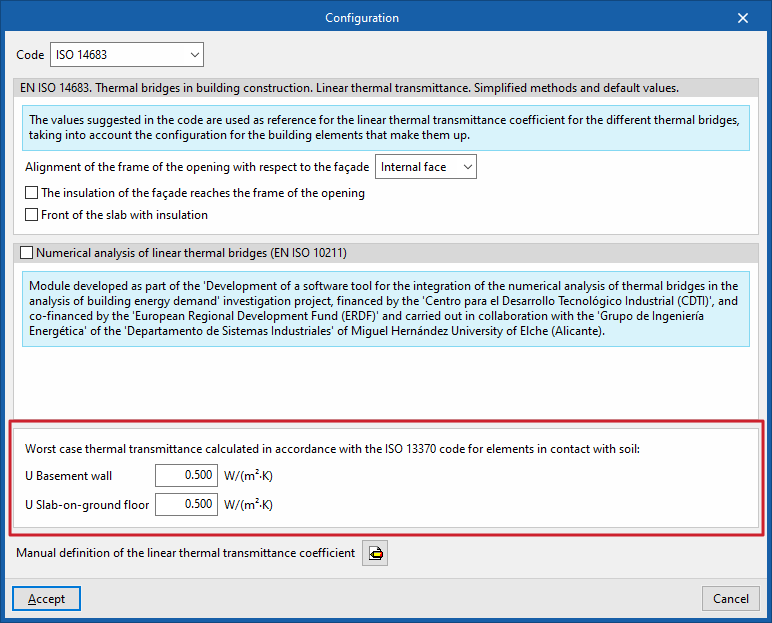
Very poor thermal transmittance calculated in accordance with ISO 13370 for elements in contact with the ground
This section sets out the thermal transmittances of basement walls and floors in contact with the ground:
- U Basement wall
- U Slab-on-ground floor
Manual definition of the linear thermal transmittance coefficient
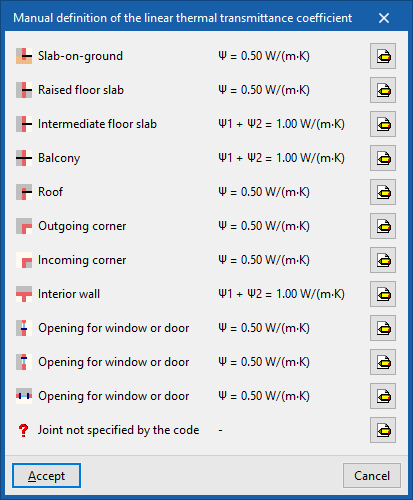
Clicking on the edit button in this section opens the "Manual definition of the linear thermal transmittance coefficient" window, which displays the types of thermal bridges associated with the selected standard.
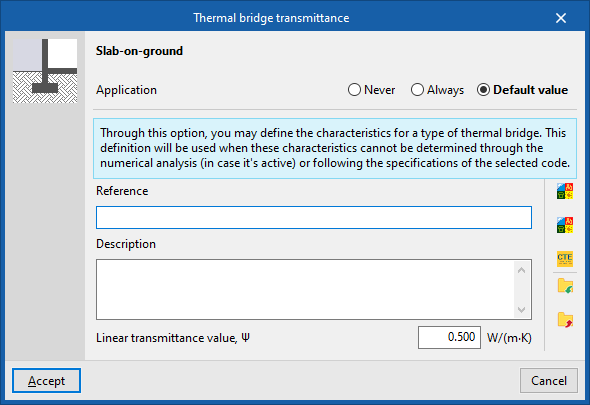
For each type of thermal bridge, by clicking on the edit button on the right, you can choose from the following three options, which allow you to adjust the definition of its linear thermal transmittance:
- The thermal characteristics of the selected linear thermal bridge are never
taken into account. - Always
take into account the thermal characteristics defined for the selected linear thermal bridge. The program lets you enter a "Reference", a "Description" and the "Linear transmittance value, ψ" for the type of thermal bridge. - Default value
The thermal characteristics defined for the selected linear thermal bridge will be used in the calculation where it has not been possible to determine them either through numerical analysis (where enabled) or in accordance with the specifications of the reference standard used. Similarly, the program lets you enter a "Reference", a "Description" and the "Linear transmittance value, ψ" for the type of thermal bridge, which will only be used in the case described.
When you select the "Always" or "Default values" options, the program displays data import wizards on the right-hand side, allowing you to import data from various regulatory catalogues or files on your hard drive.
If relevant standards have been selected, the program allows the import of values for linear thermal bridges described in the RT Existant, RT2012 and CTE DB HE1 (2013) standards, as shown on the right.
Linear thermal bridges created in this way can also be imported or exported to .bibgen files on disk using the corresponding buttons.
Order of priority for assigning thermal parameter values
The program follows this order of priority when assigning values to the thermal parameters during edge processing:
- Value entered manually using the "Always" or "Never" option
These values can be defined for each type of thermal bridge in the "Settings" window by editing the "Manual definition of the linear thermal transmittance coefficient" section, editing a specific type of thermal bridge and, finally, selecting the "Always" or "Never" option. - Value calculated by numerical analysis of linear thermal bridges
If the "Numerical analysis of linear thermal bridges (EN ISO 10211)" option is selected in the "Settings" window, and only for the types of thermal bridges that are analysed. - Value derived from the reference standard
The reference standard is selected in the "Standard" section of the "Settings" window. - Value entered manually using the "Default value" option
These values can be defined for each type of thermal bridge in the "Settings" window by editing the "Manual definition of the linear thermal transmittance coefficient" section, editing a specific type of thermal bridge and, finally, selecting the "Default value" option.
