

"Building" tab interface
The "Building" tab, accessible from the top of the "Thermal model" panel, lets you define the building’s spaces, structural elements, openings and linear thermal bridges, as well as their location and other general project details.
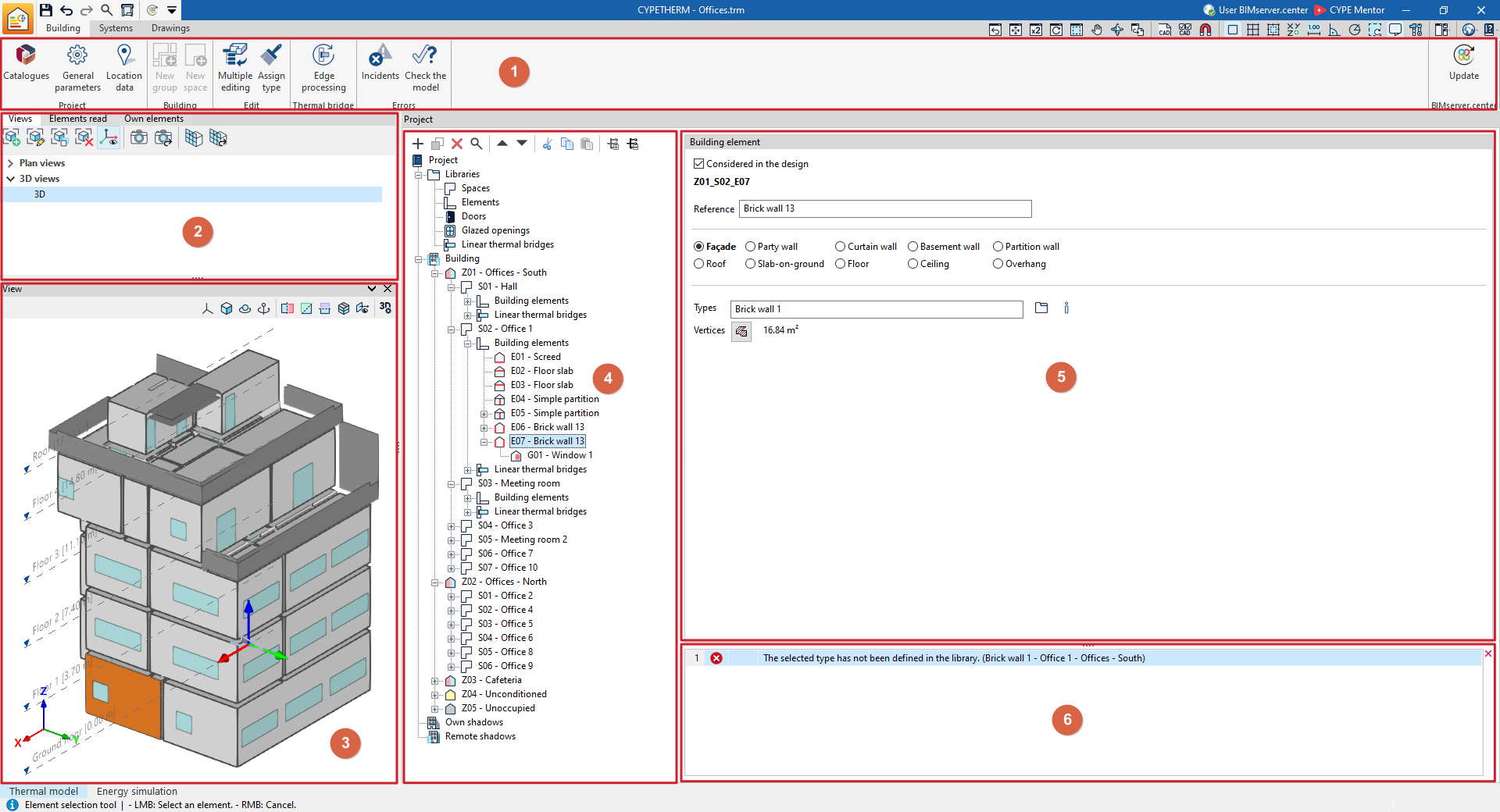
This tab features an interface comprising the following areas:
Toolbar (1)
The top options bar contains tools for downloading and updating manufacturers’ catalogues, configuring general project parameters and location data, accessing the wizards for editing and assigning groups, zones and building elements, as well as the edge processing tool, to check the model and to update project information on BIMserver.center.
Managing views, read elements and own elements (2)
These panels, located in the various tabs at the top of the left-hand side, let you carry out the following actions:
- Manage the views of the 3D model
- Control the display of the elements read from the models incorporated into the BIMserver.center project
- Control the display of the elements specific to the program’s thermal and analytical models
View (3)
Located at the bottom of the left-hand sidebar. Lets you view the 3D model of the building, as well as the position of the selected element in the tree or in the main area. It also lets you select elements directly by clicking on their graphical representation.
Project tree diagram (4)
Located in the centre. It includes the following:
- In the "Libraries" section
The libraries for "Spaces", "Structural elements", "Doors", "Glazed openings" and "Linear thermal bridges". - In the "Building" section
A navigation tree where you can select the zones or groups and the areas, the building elements and linear thermal bridges that make up the building, as well as, where applicable, self-shadows and remote shadows.
Main editing area (5)
In this area, located on the right, you can edit the elements selected in the tree, including:
- The libraries for "Spaces", "Structural elements", "Doors", "Glazed openings" and "Linear thermal bridges"
- The properties of each "Zone", "Space", "Structural element", "Opening" or "Linear thermal bridge" in the building individually.
Issue viewer (6)
Appears at the bottom of the main editing area and displays any warnings or errors encountered whilst the template is being checked.
