

Managing manufacturers’ catalogues
In the "Project" section of the main toolbar on the "Building" tab, you will find the option to manage manufacturers’ product catalogues so that they can be incorporated into the project:

Catalogues
The "Catalogues" option lets you download manufacturers’ catalogues via the connection to the Open BIM Database, making it easier to enter data into the program for project development.
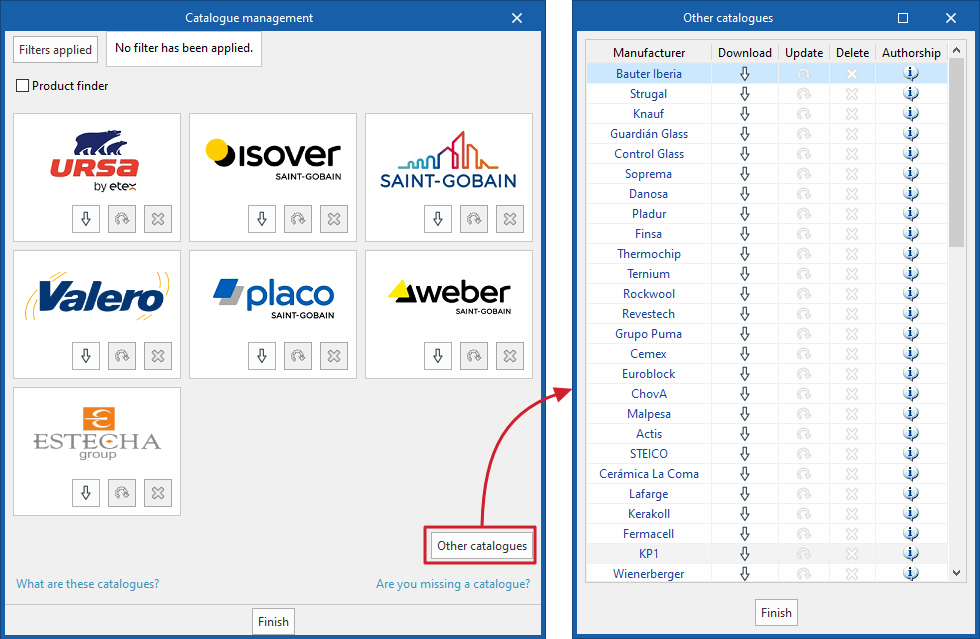
Clicking on this option opens a window showing the available manufacturer catalogues. Furthermore, clicking on the "Other catalogues" option displays a more extensive list of available manufacturers.
Using the "Filters applied" option, you can apply filters by item "Category" (for example, "Vapour barriers", "Solid materials", complete "Construction solutions" or "Glazing"), by "Language" and by "Country", to display only those manufacturers that offer product catalogues with these characteristics.
The following options are displayed for each manufacturer:
- Download
Download the manufacturer’s catalogue. The products in the catalogue will be available in the project. In the download window, you can carry out the "Catalogue selection" and, if required, view the "Contents" of the selected catalogue. You must also read and accept the "Responsible declaration", which states that the accuracy of the analysis data or the availability of the products in these catalogues cannot be fully guaranteed; therefore, you should always use them under your own supervision and responsibility. - Update
Update the catalogue for the selected manufacturer to the latest version, deleting the version previously downloaded to the project. - Delete
Delete the catalogue for the selected manufacturer. The products in the catalogue will no longer be available in the project.
| Note: |
|---|
| Products from the downloaded catalogues can be selected when defining the libraries of elements in the project tree. |
