

Options in the "BIMserver.center" group in the "Building" tab
In the "BIMserver.center" section of the main toolbar on the "Building" tab, you will find the following feature, which is required to use the program together with other BIMserver.center tools:

Update
The "Update" option lets you synchronise changes made to the BIM model, so that they are reflected in CYPETHERM.
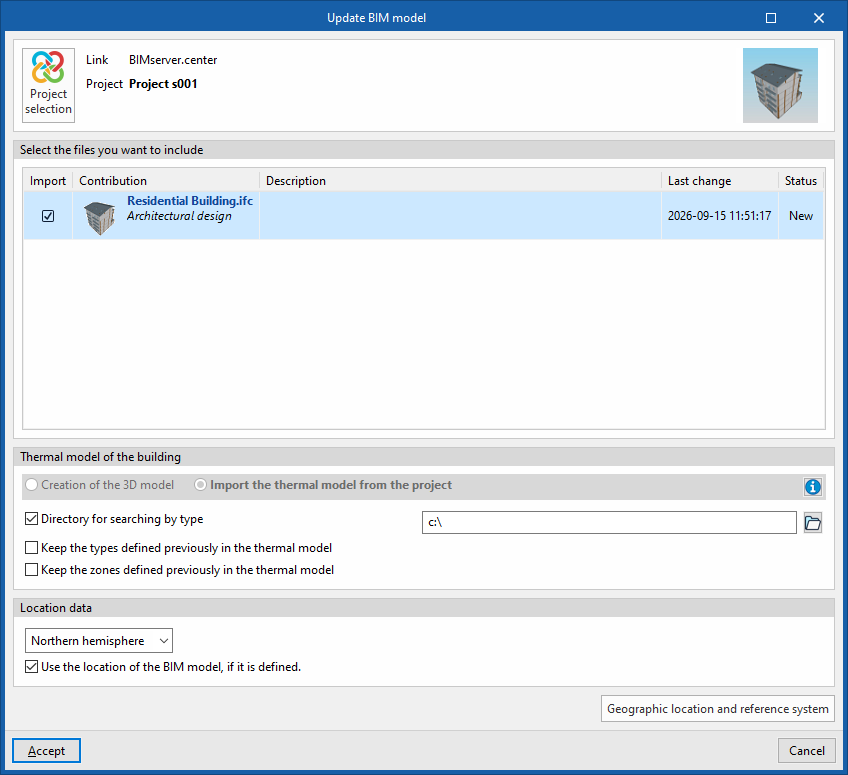
Clicking on it brings up the "Update BIM model" panel. Here, by ticking the "Import" box in each row, you can update the information contained in the models previously imported into the project or import new models if required.
- Thermal model of the building
The drop-down menu in this section will be disabled, as this setting cannot be changed once the project has been created. If you need to change this setting, you will need to create a new project.
Furthermore, if the option "Import thermal model from the project" has been selected when creating a new project, the program offers the following options:- Directory for searching by type (optional)
When this option is enabled, you can select a directory on the hard drive where the type library files are stored. This lets you import type libraries previously created in other projects and exported to that directory, and automatically assign them to the spaces, elements and openings in the imported model. To do this, the type references in the selected directory must match the element type references in the imported model. - Keep the types defined previously in the thermal model (optional)
- Keep the zones defined previously in the thermal model (optional)
- Directory for searching by type (optional)
- Location data (if the "Thermal loads" project type has been selected)
- Northern Hemisphere / Southern Hemisphere
Select the hemisphere in which the project is located. - Use the BIM model's location, if defined. (optional)
This enables the generation of shadows on the project’s elements to be completed by incorporating information on site elements (such as neighbouring buildings or nearby obstacles) that are defined in the BIM model.
- Northern Hemisphere / Southern Hemisphere
| Best practice: |
|---|
| To make the most of the Open BIM workflow, it is recommended that changes to model elements be made in the software programs in which they were originally created. Furthermore, to ensure the model is synchronised correctly and to be able to use the "Edge processing" tool, elements imported from the BIM model must retain their reference (their name). |
| Note: |
|---|
| The "Share" option, which exports the results obtained using CYPETHERM to the BIMserver.center project, is available on the analysis tab for the selected project type. |
