

"Energy simulation" tab interface
The "Energy simulation" tab, accessible from the bottom of the program interface, lets you run an energy simulation of the building modelled in the other tabs and obtain the analysis results.
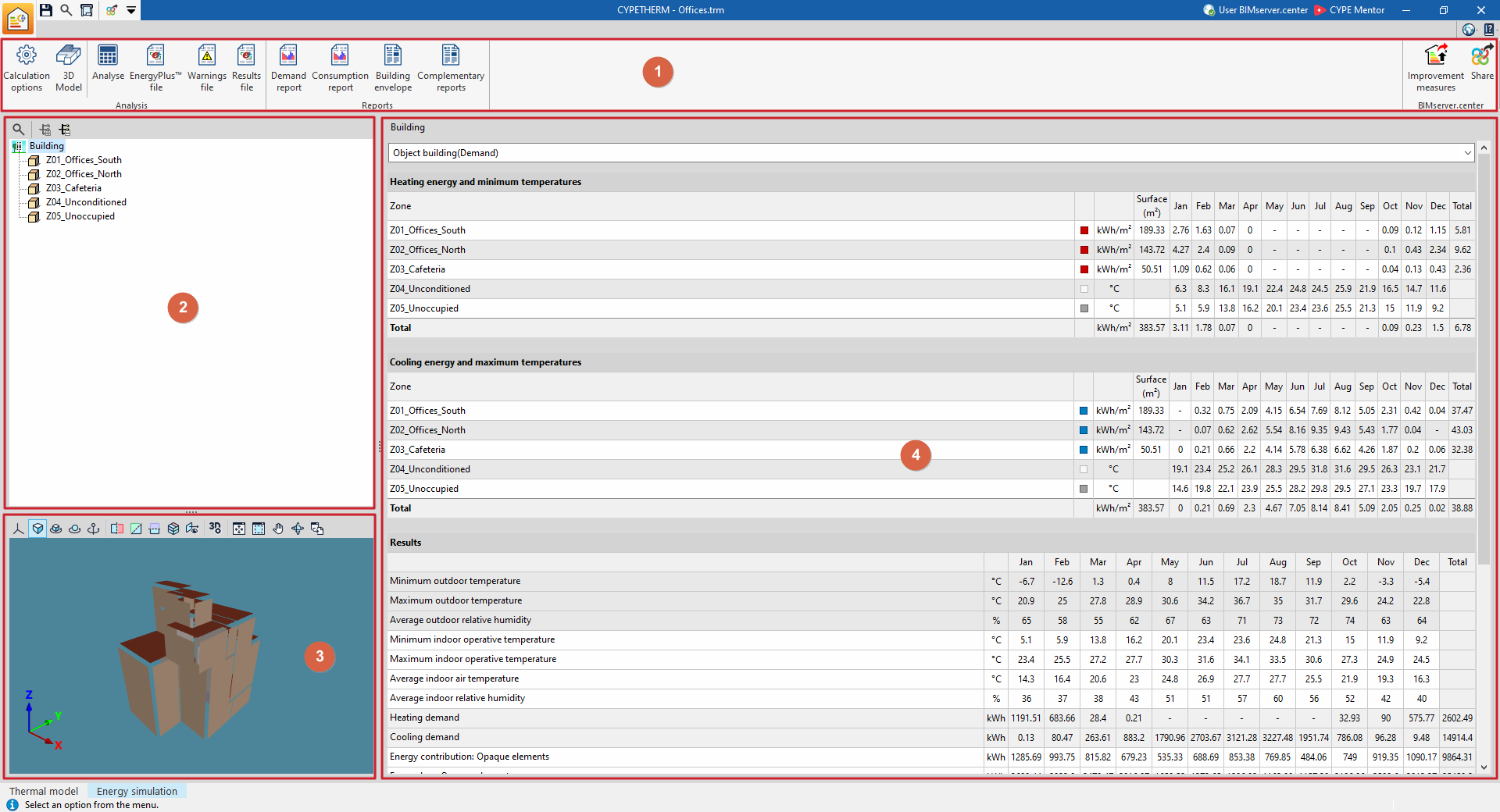
This tab features an interface with the following areas:
1. Toolbar
The top toolbar contains functions for configuring and performing the analysis, as well as for retrieving files and lists of results.
2. Diagram of the building’s thermal zones
Located at the top of the left-hand side and shows the building’s thermal zones.
3. 3D model viewer
Located at the bottom of the left-hand side and displays the building model sent to the analysis engine; it is also accessible via the "3D model" button.
4. Main results display area
Located in the central area on the right and displays the results for the section selected in the diagram, whether this is the entire building or a thermal zone.
The simulation results are shown in detail on a month-by-month basis, according to the selection made in the diagram.
The drop-down menu at the top allows you to view the results of the various simulations carried out (demand or consumption).
If the project has not been analysed, a message will appear on screen stating this ("The project is not analysed."). Once the project has been analysed, the results will be displayed in the main window, and the option for generating the reports will be highlighted.
