Defining energy sources
Under the "Systems" tab, in the "Project" section of the main toolbar, you will find the following option, which lets you configure the project’s energy sources:

Energy sources
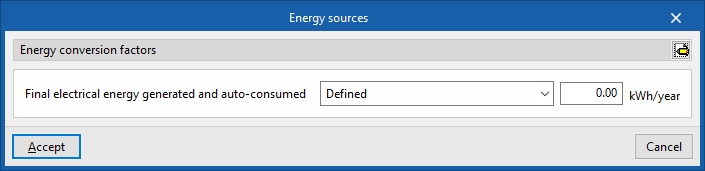
This opens the "Energy sources" window.
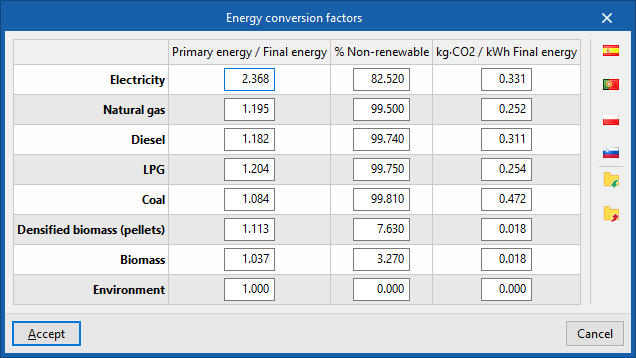
Here, using the "Advanced edit" button on the right, you can define the "Energy conversion factors", including the primary energy to final energy ratio, the percentage of non-renewable primary energy, and the CO₂ emissions factor per unit of final energy ("Primary energy / Final energy"; “% Non-renewable", and "kg·CO₂ / kWh Final energy"), for the various types of energy carriers available in the program. These are as follows:
- Electricity
- Natural gas
- Diesel
- LPG
- Coal
- Densified biomass (pellets)
- Biomass
- Environment
You can import settings from different countries (such as Spain, Portugal, Poland or Slovenia) using the options on the right, as well as import or export this information to .bibgen files on your hard drive.
Next, under the heading "Final electricity generated and self-consumed", you can define the annual amount of electricity generated and consumed by the building itself, usually resulting from the use of on-site renewable energy sources (solar photovoltaic systems, small wind turbines, small hydropower plants, etc.).
To do this, select one of the following options:
- Defined
By selecting this option, you enter the final amount of electricity generated and self-consumed directly; this may differ from the final amount of electricity consumed. The figure entered will be subtracted from the annual final electricity consumption to determine the proportion of electricity consumption sourced from the grid. - All the electricity consumed is generated
If you select this option, the program will assume that all the electricity consumed in the project is generated within the building itself.