

"Thermal loads" tab interface
The "Thermal loads" tab, accessible from the bottom of the program interface, lets you run the thermal load analysis for the building modelled in the other tabs and view the results of the analysis.
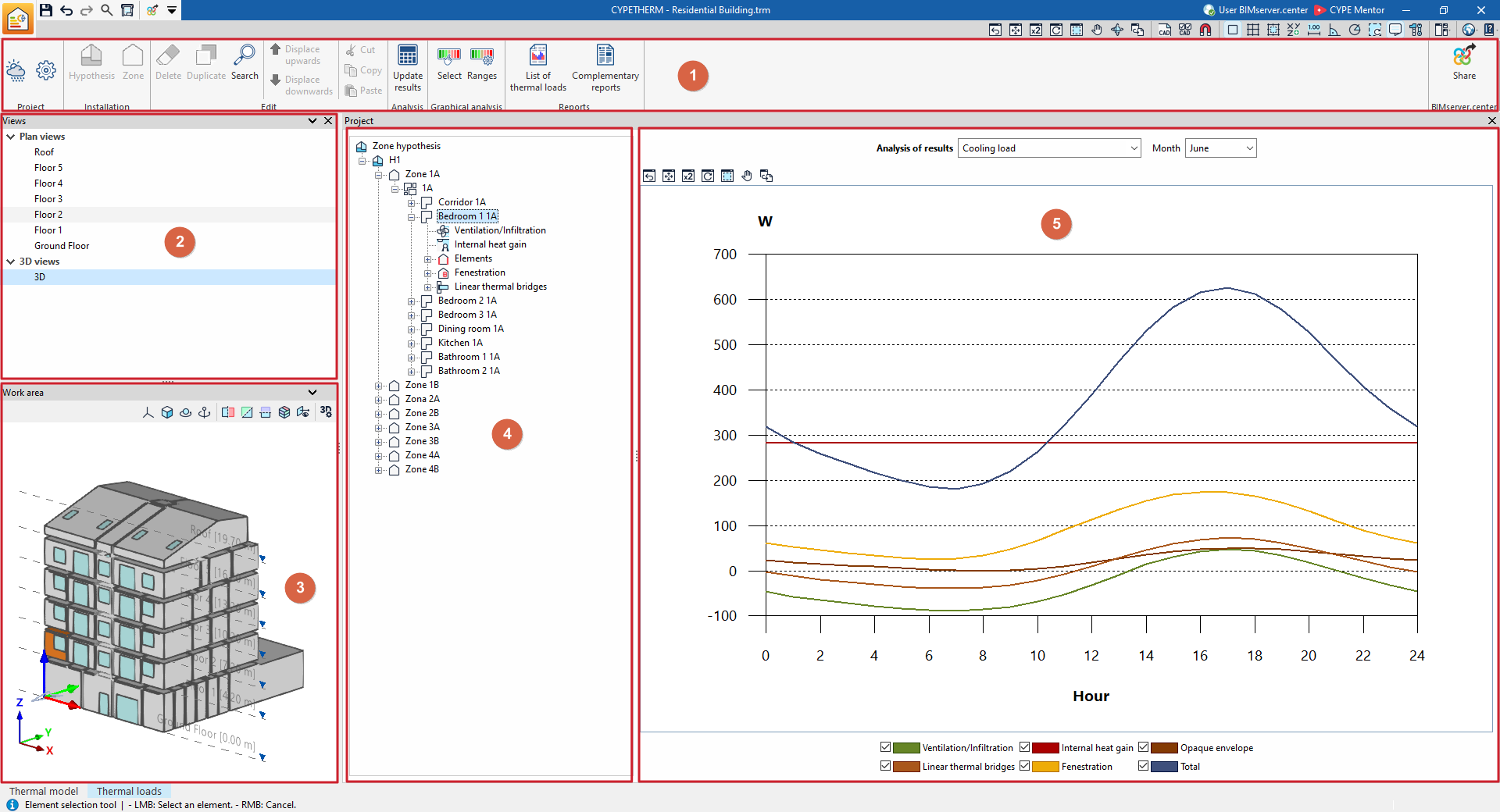
This tab features an interface comprising the following areas:
1. Toolbar
The top toolbar contains tools for configuring and performing calculations, as well as for retrieving files and lists of results, and for sharing the information obtained from the program with the BIMserver.center project.
2. View management
Located at the top of the left-hand sidebar, it provides tools for creating and managing model views.
3. 3D model viewer
The "Workspace" at the bottom of the left-hand sidebar displays a three-dimensional view of the project according to the selected view and highlights the selected element in the tree.
4. Project tree diagram
Located in the central area, it displays the navigation tree for the zoning scenarios, groups of spaces, areas and elements that make up the project.
5. Main results display area
Located on the right, once the calculation has been carried out, it displays the detailed results for the section selected in the diagram, whether this is a group of spaces, a single space or an element within a space.
