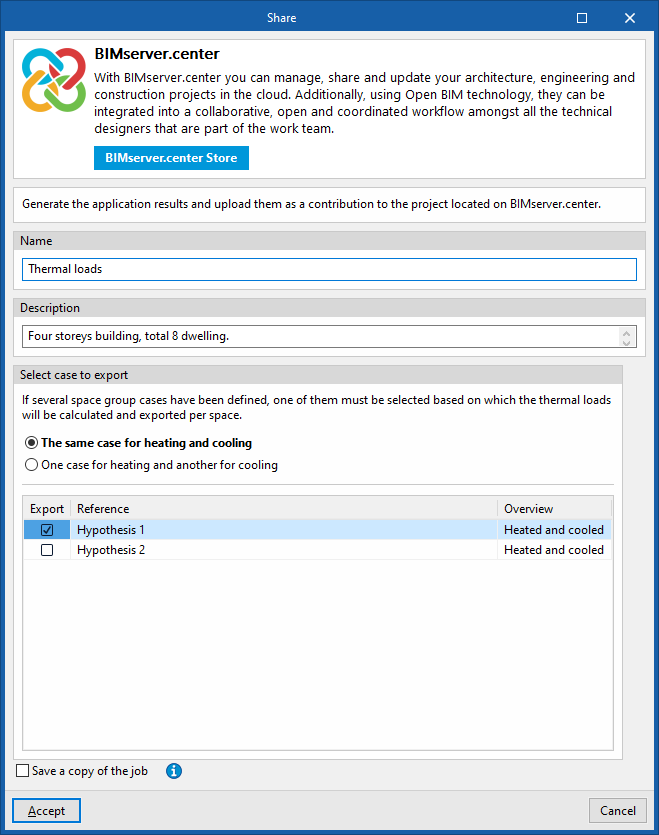
Options in the "BIMserver.center" group in the "Thermal loads" tab
In the "BIMserver.center" group of the main toolbar in the "Thermal loads" tab, you will find the feature required to share the program’s results with other tools linked to the BIMserver.center project.

Share
Export the information from the model created using CYPETHERM to BIMserver.center so that you can share it with other users.
During the export process, you can specify details relating to the identification of the files to be exported and select the information you wish to export.
- Name
- Description
- Select case to export
If several space grouping cases have been defined, you must select one of them, based on which the thermal loads per room will be calculated and exported. You can select one of the following:- The same case for heating and cooling
- One case for heating and another for cooling
- Save a copy of the job
If this option is enabled, a compressed file in CYP format containing the model information at the time of export will be saved. This backup copy is saved in a folder named after the project, with the extension _bak, located in the directory where the project is stored (by default, C:\CYPE Ingenieros\Proyectos\CYPETHERM \projectname_bak). Each time the "Share" option is used whilst this option is ticked, a new backup file in CYP format will be generated in this folder
This way, the app’s results are generated and uploaded as a contribution to the project hosted on BIMserver.center for subsequent import into other programs.