Tools in the "Representation" group in the "Drawings" tab
The options in the "Representation" section of the "Drawings" tab let you carry out the following operations:

- Generate
Generate the building drawings based on the information entered in the "Building" tab.
- Options
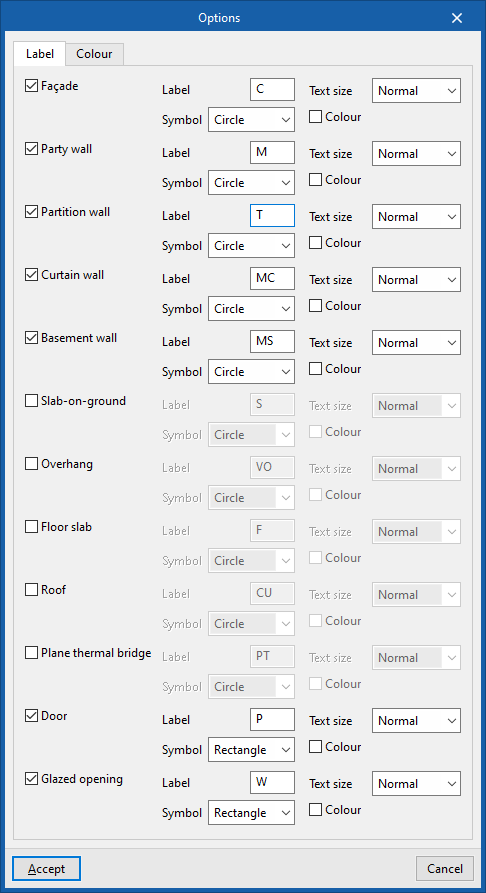
Manage the label and colour of the model elements that are generated in the drawings (when using the "Generate" option).- "Label" tab
Change the label text, its symbol, the text size and colour for each element in the template:- Façade
- Party wall
- Partition wall
- Curtain wall
- Basement wall
- Slab-on-ground
- Overhang
- Floor slab (between storeys)
- Roof
- Plane thermal bridge
- Door
- Glazed recess
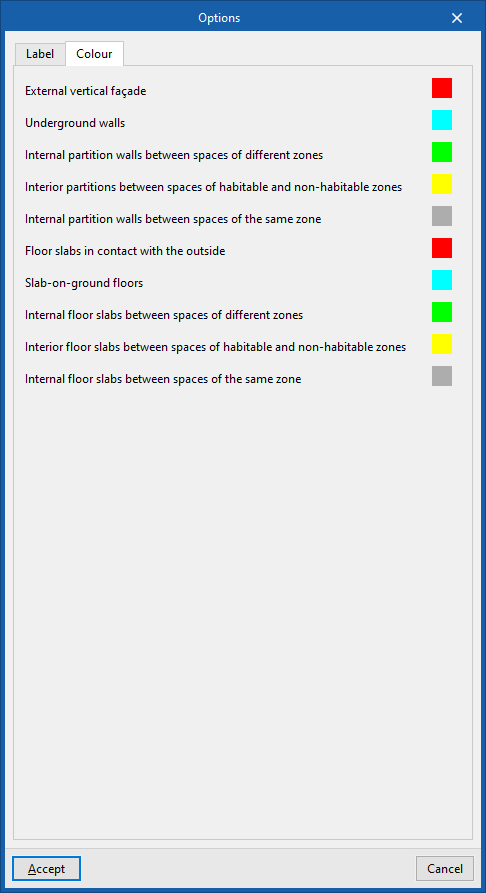
- "Colour" tab
Change the display colour of model elements according to their category:- External vertical façade
- Underground walls
- Internal partition walls between spaces of different zones
- Internal partitions between spaces of habitable and non-habitable zones
- Internal partition walls between spaces of the same zone
- Floor slabs in contact with the outside
- Slab-on-ground floors
- Internal floor slabs between spaces of different zones
- Interior floor slabs between spaces of habitable and non-habitable zones
- Internal floor slabs between spaces of the same zone
- "Label" tab