Tracking changes
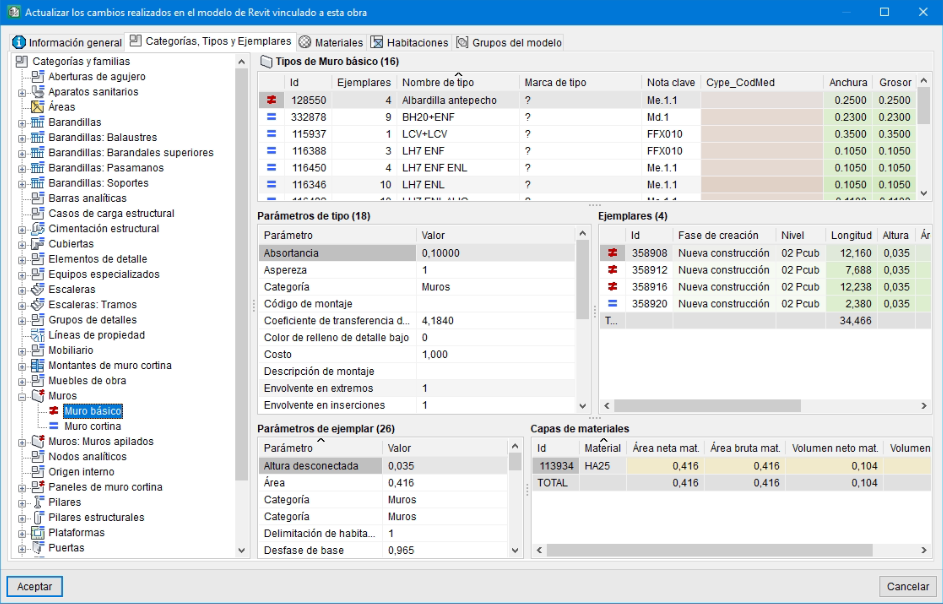
The "Update changes carried out in the Revit model linked to this job" dialogue box allows you to update changes to the model, identifying new, deleted and modified elements, whilst keeping data from Revit separate from data entered or altered by the user in the quantities.
When a Revit model is linked to an Arquimedes bill of quantities, if you subsequently work in Revit making changes to the model (for example, modifying the dimensions of various building elements or deleting or creating new building elements), the information in the Revit model will change and cause changes to various parameters of instances, types and even families and categories. In such cases, if the Revit model information is updated again by linking or importing the Revit model’s .mcsv file into the Arquimedes bill of quantities, the change tracking feature highlights the modifications by marking the categories, families, types and instances that have changed.
The markers are as follows:
 Unmodified entity
- Modified entity
 New entity
 Deleted entity
 Unmodified entity
 Modified entity
 New entity
 Deleted entity
When you double-click on a Revit element (type, instance, material or room) marked with the modified element symbol (), the "Differences in (…)" dialogue box appears. Parameters that have changed are highlighted in red.