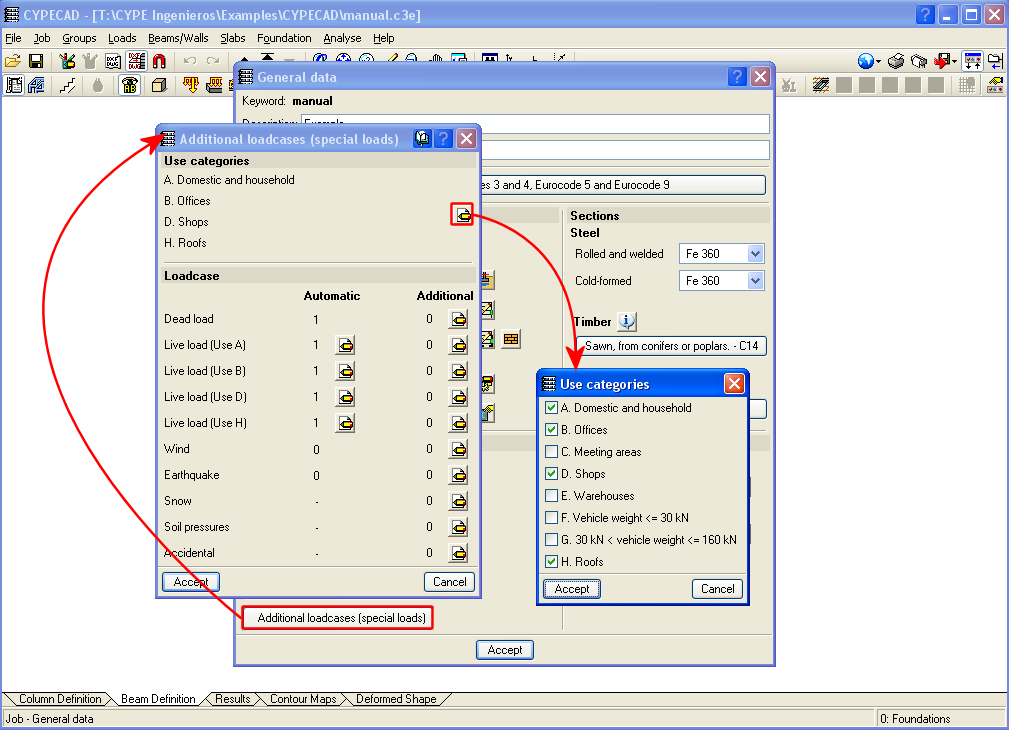
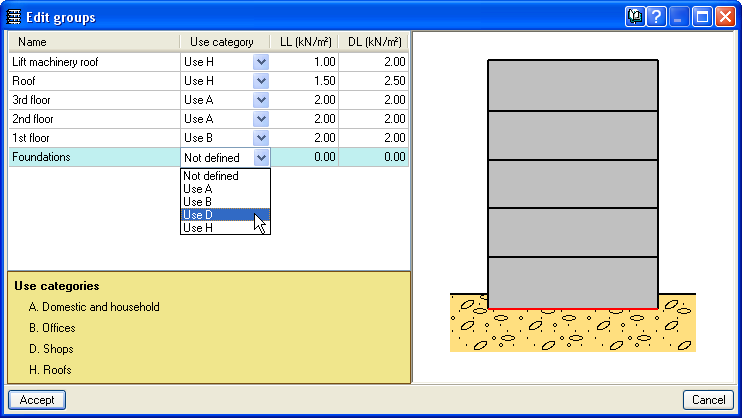
Now in CYPECAD, different use categories can be defined for each floor group of the structure. Examples of use categories include: dwellings, shops, warehouses, garages, etc. The number of use categories the program allows to choose amongst depends on the selected code. For example, the use categories for the Eurocode are:
- A. Domestic and household
- B. Offices
- C. Meeting areas
- D. Shops
- E. Warehouses
- F. Vehicle weight <= 30 kN
- G. 30 kN < vehicle weight <= 160 kN
- H. Roofs
For the program, a use category consists of a group of live loadcases, be they automatic or additional, which combine with the other loadcases that have been defined in the job with the same combination coefficients.
This way, the live load combinations for each use category can be analysed correctly amongst all the use categories and the remaining loadcases of the job for which different use categories exist per floor.
The use categories can be selected in the Additional loadcases (special loads) dialogue box within the General data window (Job > General data > Additional loadcases (special loads)). The categories that are selected in this dialogue box are assigned to each floor group in the Edit groups dialogue box which opens by selecting the Loads menu within the Beam Definition tab > Loads in groups or in the Column Definition tab > Floors/Groups > Edit groups.
Different use categories can also be defined for a floor group. To do so, simply do not introduce a live load for the group and once the geometry of the floor group has been defined, introduce the live loads at different positions on the group, assigned to the corresponding loadcase.
The user should bear in mind that the more use categories are defined for a job, the more loadcase combinations the program will create, and so, the time taken to analyse the job will be substantially longer.