Add sub work sections to the bill of quantities
The work sections of a bill of quantities are supplemented by sub work sections at various levels.
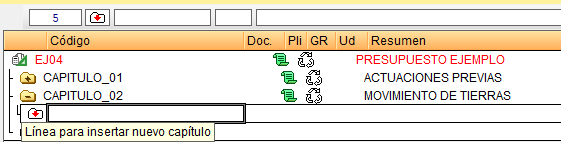
To add a new "Sub work section", hover over the folder of the work section in which it is to be included and open it by double-clicking on it. This will create a new folder within the work section. There are then several ways to open the dialog box for inserting a new sub work section, such as:
- Double-click the insert work section icon (a white folder with a red downward arrow).
- From the "Insert breakdown line..." option in the right-click menu or the "Tree" menu.
- Hover over the "Code" column and press "Insert" on the keyboard.
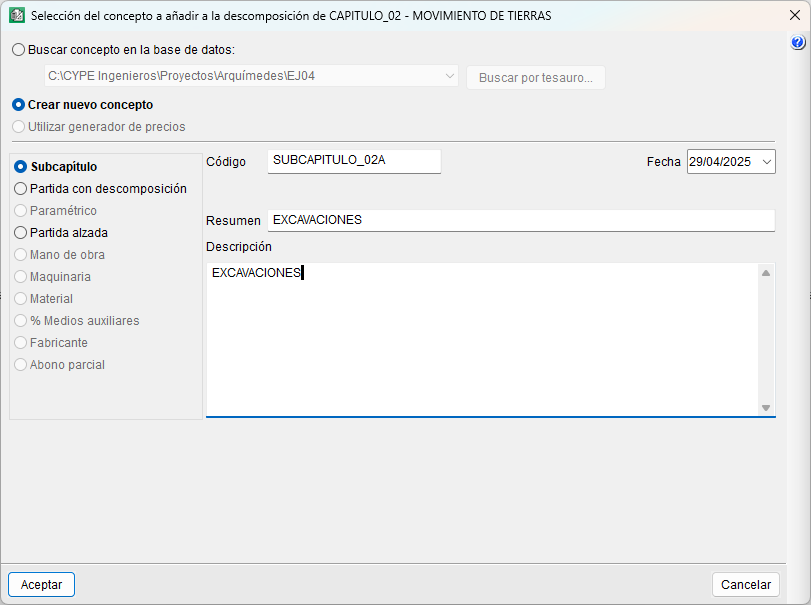
Using one of the three methods described above, the "Select item to add to the breakdown of..." dialog box will open. Here, select "Create new item" and "Sub work section", and enter at least the code and summary.
| Best practice: |
|---|
| To delete a work section or sub work section, simply hover over its folder and press "Delete" (or "Del") on the keyboard. To change the code or title of a work section or sub work section, hover over it, type in the new one and press "Enter" on the keyboard. |