

Adding items to the bill of quantities
Once the structure of work sections and sub work sections has been created, items can be inserted at the desired level.
In Arquimedes, the bill of quantities can be broken down; that is, it can consist of other components (materials, machinery, labour, etc.) required for the execution of the work. They can also be simple items without a breakdown, i.e. items without a unit breakdown, such as lump-sum items. Furthermore, items can be copied from another bill of quantities or cost database (“Search in”); they can be created directly in the current bill of quantities (“Create new item”); or they can be used in the CYPE Cost Database (“Use CYPE Cost Database”).
Below are the different types of items that can be added to Arquimedes and how to enter them into the bill of quantities.
Create items without breakdown (Unjustified items)
These types of projects are difficult to assess initially, either because it is unclear what needs to be done to execute them or because they depend on third parties. One example would be utility connections.
There are two types of unjustified items:
- Lump-sum payments
These are treated in the same way as unit prices. Their total quantity is always one unit. They are paid in full to the contractor once the works to which they relate have been completed. They always appear in the pricelists and in the list of unit prices in the price justification appendix. - To be verified on site
These items are subject to quantities, using the relevant quantities and the unit prices from "Price table No. 1" or approved alternative prices. These items do not appear in the pricelists or in the list of unit prices in the price justification appendix.
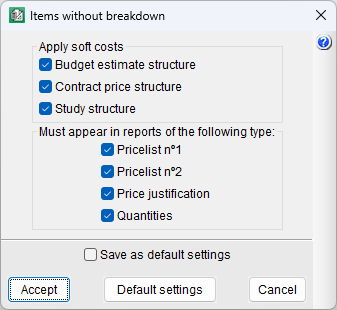
In Arquimedes, you can configure how items without breakdown are handled via the "Items without breakdown" option in the "Settings" section of the "View" menu.
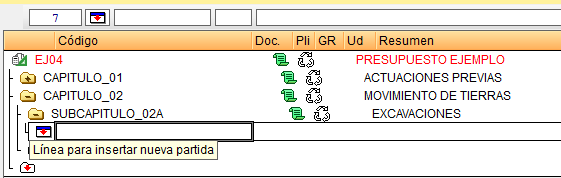
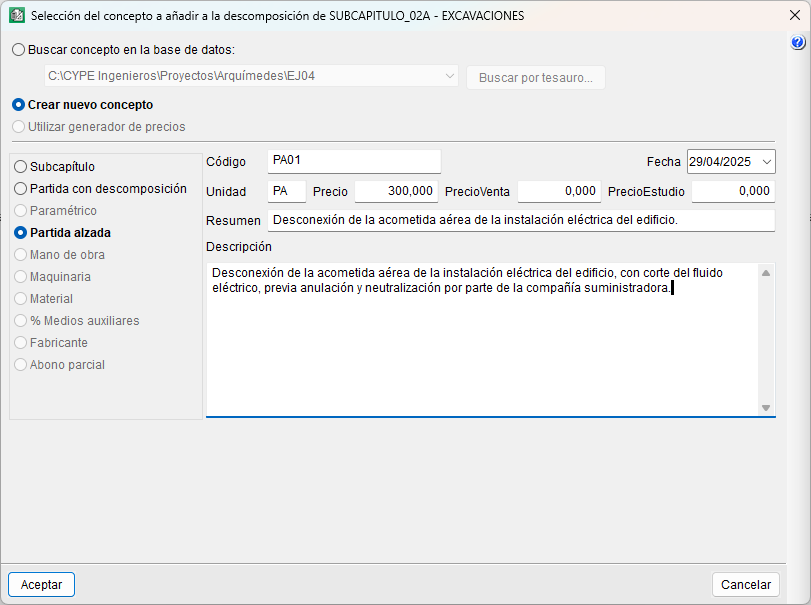
To insert an unjustified item, you must open the folder for the work section or sub work section where you wish to add it, and either double-click the insert item icon (a white rectangle with a blue band and a red downward-pointing arrow) or right-click on that folder and select the "Insert breakdown line" option from the context menu or the "Tree" menu. Both actions will display the dialog box "Selection of the concept to add to the breakdown of...", where you should select "Create new item" and "Unjustified item", and specify at least the code, unit (usually PA), price and summary.
| More information: |
|---|
| The "Unjustified item" (or PA) created will display a green rectangle with a blue stripe and may show a price slightly higher than the one entered, as it includes the application of soft costs to the item. To adjust the soft cost, go to the "Percentages" option in the "Settings" section of the "View" menu. |

