Adjusting the bill of quantities by quantities
It is possible to adjust the Material execution budget or the current certificate by modifying the value of the measured or certified quantity in the items.
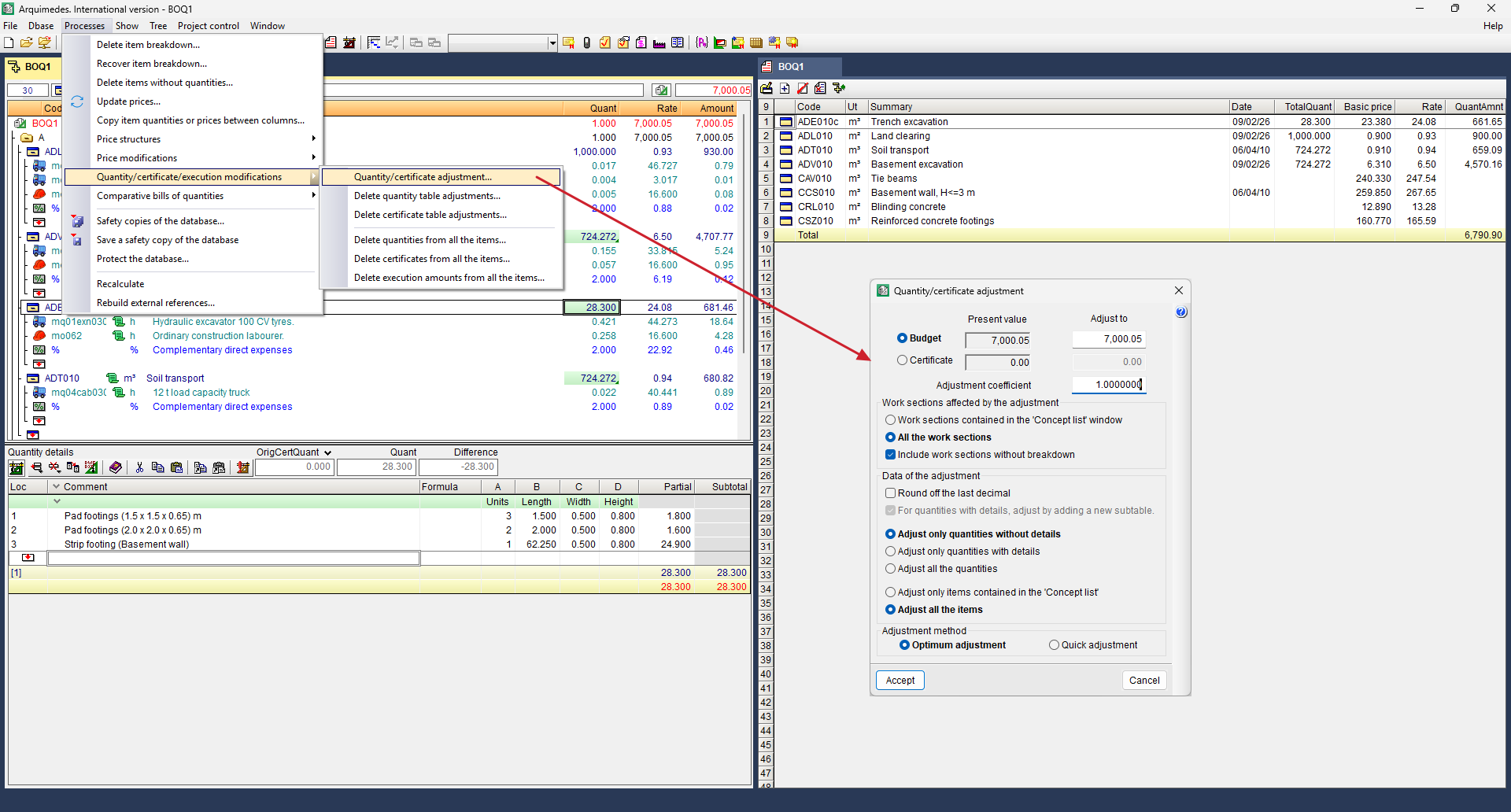
To carry out this operation, open the "Processes" menu and select "Quantity/certificate/execution modifications", "Quantity/certificate adjustment".
This option has two variants: quantity adjustment or certificate adjustment. We will now look at quantity adjustment in more detail.
The way this dialog box works is similar to that of "Partial adjustment" or “Bill of quantities adjustment”; only the bill of quantity items to which the adjustments can be applied change.
Firstly, it allows for adjustment of the material execution budget by setting a new amount in "Adjust to" or in the adjustment coefficient.
Secondly, you specify which work sections you wish to apply the quantity adjustment to: those selected in the "Concept list" window or all of them.
Thirdly, it allows you to tick the option to round to the nearest decimal place and select which items the adjustment applies to:
- Only adjust quantities without details
When this option is enabled, the adjustment is applied only to items for which no quantity tables have been created; in other words, the adjustment is applied to the "Quantity" field in the line item. - Only adjust quantities with details
When this option is enabled, a new sub-table is added to items for which quantity tables have been created. This sub-table displays the comment "Adjustment" and the corresponding increment, which will be added to the item’s detailed quantity table. If the box "For quantities with details, adjust by adding a new subtable" is deselected, it will be added as a new line in red at the end of the breakdown. - Adjust all quantities
When this option is enabled, the relevant measurement coefficient is applied to all items in the bill of quantities, regardless of whether they include a quantity breakdown.
You can also adjust all items or just those listed in the "Concept list" window.
Finally, you can choose between the optimal or quick adjustment method.
Once the adjustment is complete, the "Adjustment result" dialog box will appear, showing the number of items with and without bill of quantities details that have been adjusted. To view the changes in detail, click on "See detail".
| Best practice: |
|---|
| These quantity tables can be reset at any time using the "Delete quantity table adjustments" option, which can be found in the "Processes", "Quantity/certificate/execution modifications" menu. They will also need to be removed from the reports using the "Report Template Editor". |