Analytical codes
Arquimedes allows you to generate bill of quantities reports by cost centre code. This means that, regardless of the bill of quantities work section structure, you can generate reports based on the work section structure of another database (bill of quantities or cost database) provided that the item exists in the reference database (and the codes match).
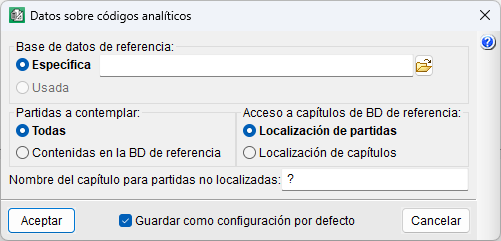
To do this, you must use the "Analytical codes" templates and define the following details regarding analytical codes:
- Reference database
Choose between using the work section structure of the auxiliary database currently in use in the bill of quantities (which will normally be a cost database), or using a different database. - Items to contemplate
Choose between listing only the items contained in the reference database, or all items. If the latter is selected and the bill of quantities contains items not belonging to the referenced database, these will be included in a separate work section, initially unnamed unless a name is entered in "Name of the work section for items not located". - Access to reference database work sections
Choose the item location, respecting the original work section structure of the reference database, or the work section location, which assigns items based on the relationship between their code and existing work sections, searching for progressive code matches (for example, from "ABCD.1" to "ABCD", "ABC", etc.).