Marks for reviewing items
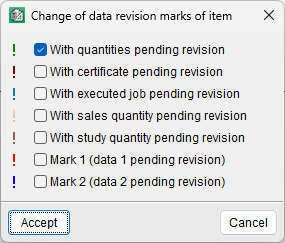
Item review marks allow users to identify, at the item level, those items that need to be reviewed. There are five types of marks that can be applied to an item with a measurement, certificate, execution, sales or study quantity pending review. Users can also choose two additional types of marks to review data as they see fit (mark 1 or mark 2). There can therefore be 7 types of item review marks.
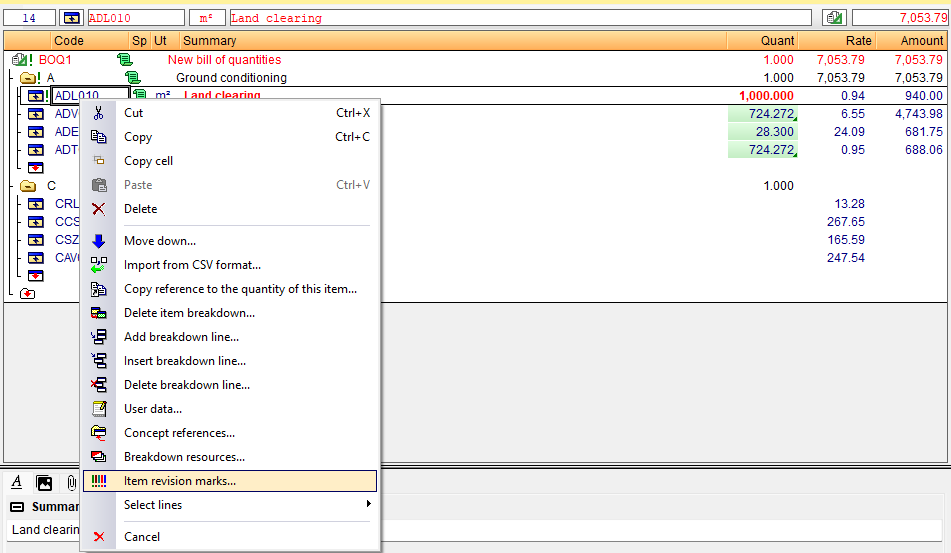
Each item marked in this way is indicated by an exclamation mark ("!"), which takes on a different colour in each case to identify the type of mark selected. This symbol is placed to the right of the item symbol. The marks are propagated upwards, causing the work sections containing the item to be flagged as well, right up to the root work section.
Item review marks are easily applied using the "Item revision marks" option in the context menu that appears when you right-click on any field of any item.
The summary text of the description of the marked items is displayed in bold and red so that they can be identified more easily.
When a report is printed, the program alerts the user if there are any marks in the project.