


Options in the "Project control" menu
In the top menu bar, you will find the "Project control" menu, which brings together all the tools for the economic, administrative, and financial monitoring of the project. The drop-down menu includes:
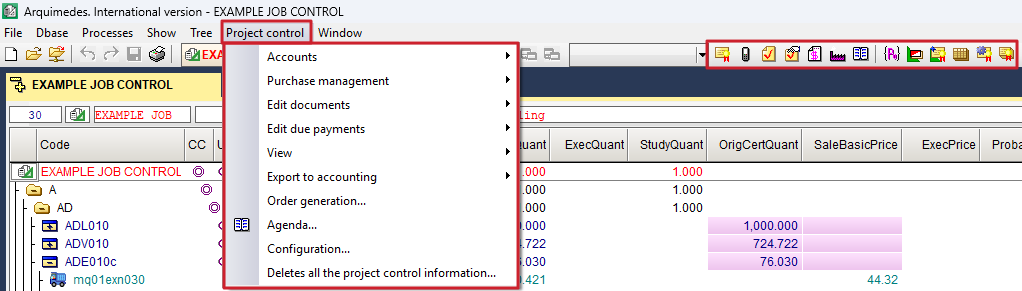
- in the "Accounts" section, the options for defining and managing data on supplier accounts, customer accounts, financial accounts, purchasing accounts, sales accounts, input and output VAT, supplier and customer income tax, and equivalence surcharge;
- in the "Purchase management" section, the options to create purchasing groups and supplies for the project, contract supplies, request and receive bids, view purchasing comparisons, generate contracts, and view project contracts;
- In the "Edit documents" section, you will find options for managing all project documentation: contracts, orders, delivery notes, invoices, and allocations.
- in the "Editing due payments" section, the options for setting the payment or collection deadline for an invoice;
- in the "View" section, the options to check the status of accounts with suppliers and customers, view a comparison of reference prices and supplied prices, view a summary of allocations for the project or items, check payments to subcontractors and suppliers, and view a history of supplies by document;
- in the "Export to accounting" section, the options for exporting to compatible accounting programs;
- the "Order generation" option works automatically;
- the "Agenda" option, to view orders, delivery notes, invoices, and due dates sorted by date, as well as to calculate cash flow;
- the "Settings" option, to edit the project options;
- and the option "Delete site control information", which, as its name suggests, deletes all information related to site control.
In the bar immediately below the menus, there is a set of quick access icons linked to site management, organised into two functional blocks.
- The first block brings together those focused on document management for the project: "Contract editing", "Order editing", "Delivery note editing", "Quick entry of delivery notes against supplier orders ", "Editing invoices received", "Editing suppliers" and "Construction site schedule".
- The second block groups together tools related to purchasing management: "Purchasing groups", "Site supplies", "Contracting supplies", "Purchasing comparisons", "Generating contracts" and "Site contracts".
