Assigning buckling coefficients
Buckling coefficients can be assigned either during the analysis or using the following option, available in the "Buckling" section of the top toolbar, within the "Analysis" tab (under the "Structure" tab).

Assignment of buckling coefficients
The program automatically calculates the buckling coefficients for each bar included in the buckling analysis based on the critical load factors and the stressed axis.
The coefficients obtained can be allocated in two ways:
- In the same buckling analysis process launched using the "Analysis" option, by selecting the "Update buckling coefficients and check the bars" option,
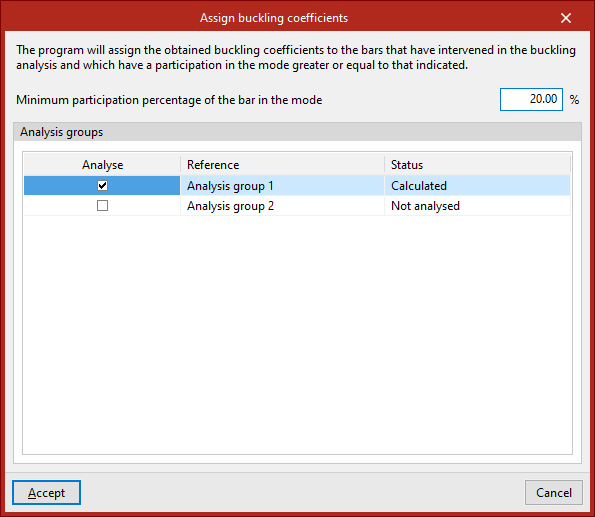
- Or by using the "Assign buckling coefficients" option in the "Buckling" group at a later stage of the analysis.
The sensitivity analysis allows us to determine which buckling modes affect each bar, to calculate and assign buckling coefficients. To this end, in either of the two cases described above, the "Minimum participation percentage of the bar in the mode" is specified so that its buckling coefficient can be updated.
The program will assign the buckling coefficients obtained to the bars that were included in the buckling analysis and that have a contribution to the dominant mode equal to or greater than the specified value.
| Note: |
|---|
| If a bar's buckling percentage exceeds the specified value, the bar is considered to be buckling in that buckling mode, and its associated critical load factor should therefore be used. Using the list of axes and the critical load factors for each member under each load combination, it is possible to determine the highest buckling coefficient for each plane. |
At the bottom of the window that appears when you click on "Assign buckling coefficients", the program allows you to select one or more of the "Analysis groups" for which the analysis has been performed. The program will assign to each bar the highest of all the coefficients calculated in the buckling analyses of the groups to which it belongs.
Clicking "Accept" applies the buckling coefficients.