

Buckling analysis: "Analysis" option
The buckling analysis is configured and run using the following option, available in the "Buckling" section of the top toolbar, within the "Analysis" tab (under the "Structure" tab).

Analysis
The "Analysis" option allows you to perform a buckling analysis. The window that appears when you click this option allows you to configure the following parameters.
These parameters must be entered for each buckling analysis group, if any have been defined. The analysis groups will appear on the left-hand side of the window. The program will perform the analysis for the groups where the "Analysis" box is ticked.
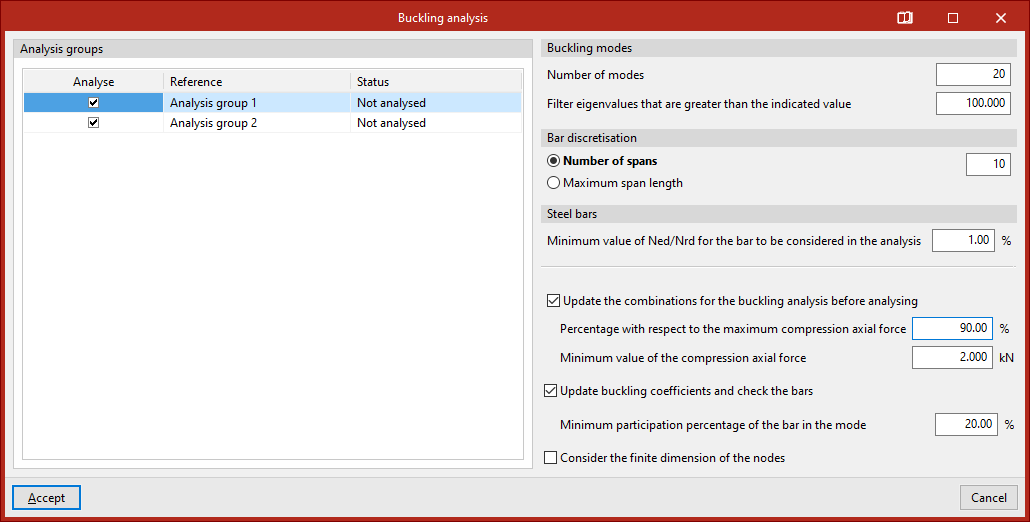
- Firstly, you can specify the number of "Buckling modes" to be analysed. If you select "Filter eigenvalues that are greater than the indicated value", modes in which the critical load factor is very high will not be displayed.
- "Bar discretisation" is also set, either by "Number of spans" or by "Maximum span length".
- Next, for "Steel bars", you can also apply a filter for bars with small compression axes by specifying the "Minimum Ned/Nrd value for a bar to be considered in the analysis". The program will not include bars with a compression axis smaller than the percentage specified in this section.
- If the structural analysis has been performed, the program displays a series of additional options for "Update the combinations for the buckling analysis before analysing", specifying the "Percentage with respect to the maximum compression axial force" and the "Minimum value of the compression axial force". This way, these combinations will be generated directly for the buckling analysis, without the need to do so beforehand via the "Combinations" option in the group.
- The program also allows you to "Update buckling coefficients and check the bars" as part of the same analysis process. To do this, you specify the "Minimum participation percentage of the bar in the mode" so that its buckling coefficient is updated. This means you will not need to use the "Assign coefficients" option in the same group.
- Finally, you can "Consider the finite dimension of the nodes" by selecting the last option.
Clicking "Accept" starts the buckling analysis.
Once completed, the program will display an "Information" message, which you must click "Accept" to confirm.
