

Buckling analysis groups
Linear buckling analysis groups can be created and edited using the "Analysis groups" option, which is available in the "Buckling" section of the top toolbar, within the "Analysis" tab (under the "Structure" tab).

The purpose of defining buckling analysis groups is to analyse the buckling behaviour of different sets of structural bars independently.
Analysis groups
A buckling analysis group defines a subset of model elements for which a buckling analysis will be performed, such that the buckling modes obtained involve only the elements in the group.
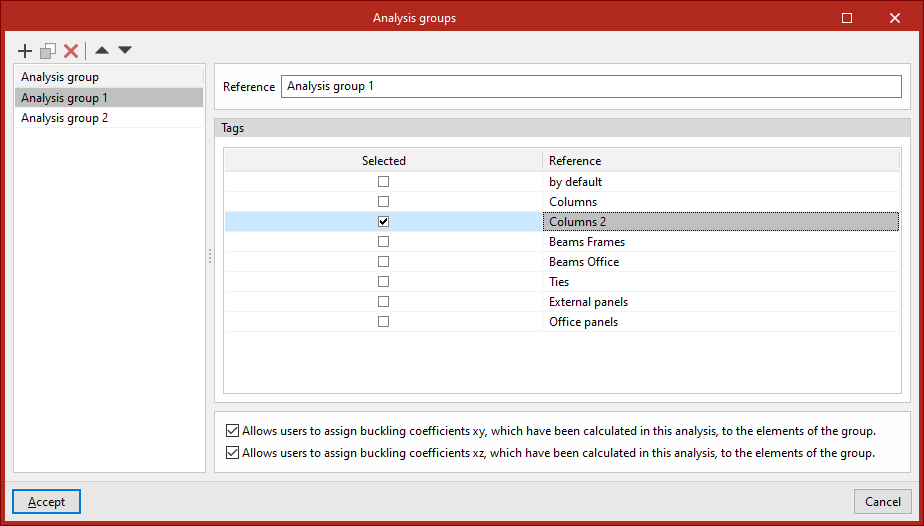
When clicking on this option, the program opens a window where you can add analysis groups to the list on the left-hand side. When adding a group, you must enter its "Reference". You must then specify the "Tags" of the elements you wish to include in the group by ticking the relevant boxes.
Finally, for each analysis group, selecting the following options at the bottom allows the buckling coefficients in each plane calculated in this analysis to be assigned to the elements in the group:
- Allows users to assign buckling coefficients xy, which have been calculated in this analysis, to the elements of the group (optional)
- Allows users to assign buckling coefficients xz, which have been calculated in this analysis, to the elements of the group(optional)
Defining buckling analysis groups is optional:
- If no groups are defined, the program will perform a single analysis taking into account all bars and shells in the model that are marked with the "Include in buckling analysis" option (under the "Properties" tab, in the "Bar" and/or "Shells" sections, "Buckling" option).
- If one or more buckling analysis groups are defined, the buckling analysis for each group will take into account all bars marked with the "Consider in buckling analysis" option and which also have one of the tags selected in the group definition assigned to them.
If a beam belongs to more than one group and its buckling coefficient is assigned automatically in the XY plane, the XZ plane, or both, it will be assigned the highest of all the coefficients calculated in the buckling analyses for the groups to which it belongs.
The buckling analysis results are displayed for the selected analysis group.
| Note: |
|---|
| Tags are defined and assigned in advance to the various elements of the structure via the "Tags" panel, which is located by default on the left-hand side of the main interface. |
