


Checking structural elements
The "Check elements" option, found in the "Stress / Strain" group on the top toolbar of the "Analysis" tab, allows you to check all the elements of the structure after it has been analysed.

Checking elements
When you click on the option, elements that pass all checks are displayed in green. Those that fail any checks are shown in red, and elements with a warning are shown in yellow.
When you hover the pointer over the bars, the information box displays the resistance demand capacity ratios ("D/C ratio - resistance") and deflection utilisation factor ("D/C ratio - deflection") if their limits have been defined.
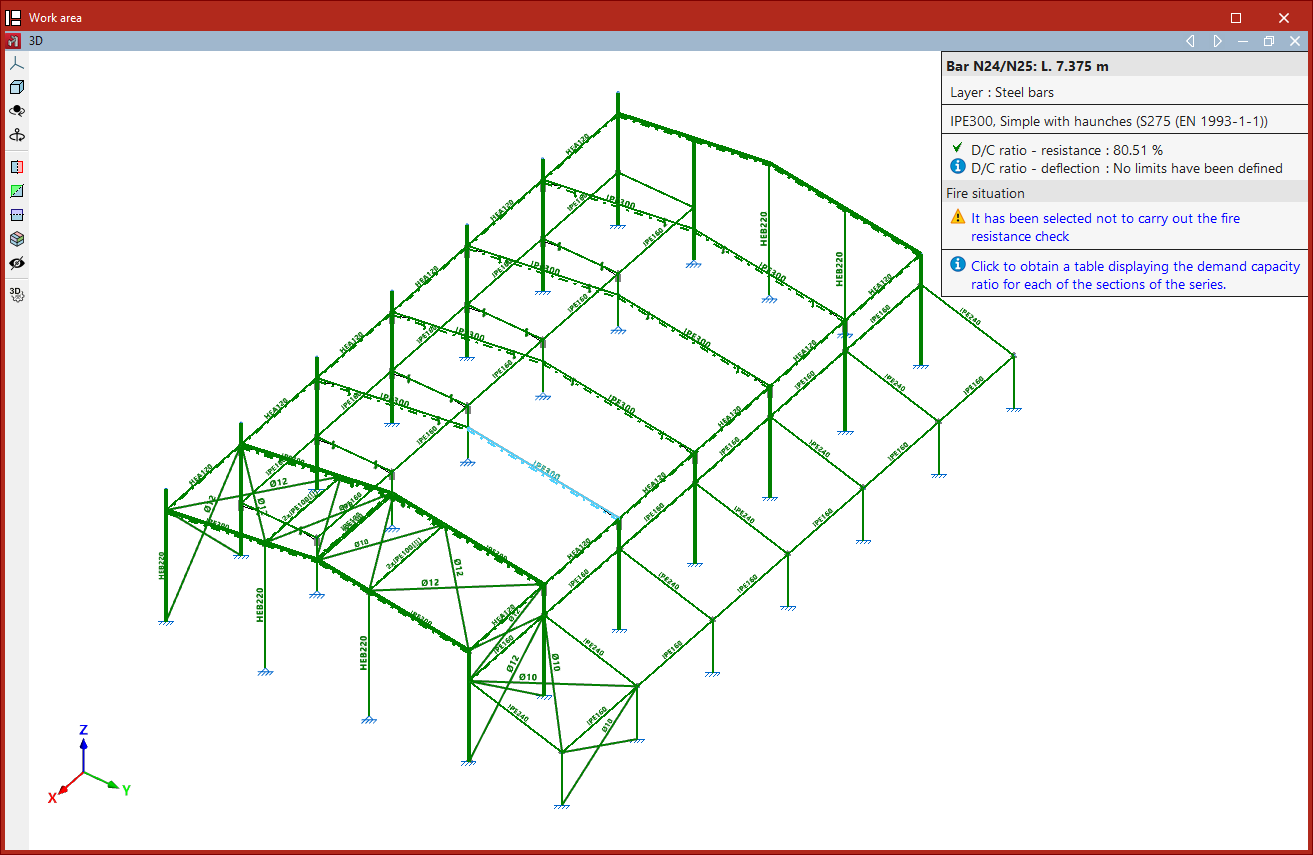
By left-clicking on a bar, a table is shown with the demand capacity ratios for all sections in the series.
| Note: |
|---|
| For bars of type "Column" or "Beam", the corresponding editor will appear instead of the table. |
In the section table, each "Section" shows its "Weight", the "Resistance" utilisation factor, the "Deflection" utilisation factor if defined, and any "Errors" it may have.
The program displays icons to indicate whether the section passes all checks or fails any of them.
When you select a section from the series and click "Accept", the program will assign that section to the selected bar.At this point, it is advisable to "Analyse" the structure again.

