

Defining load cases for modal analysis
Loadcases for modal vibration analysis can be entered and edited using the following option, which is available in the "Modal" section of the top toolbar, within the "Analysis" tab (under the "Structure" tab).

Loadcases
The "Loadcases" option allows you to define the load cases for the modal analysis.
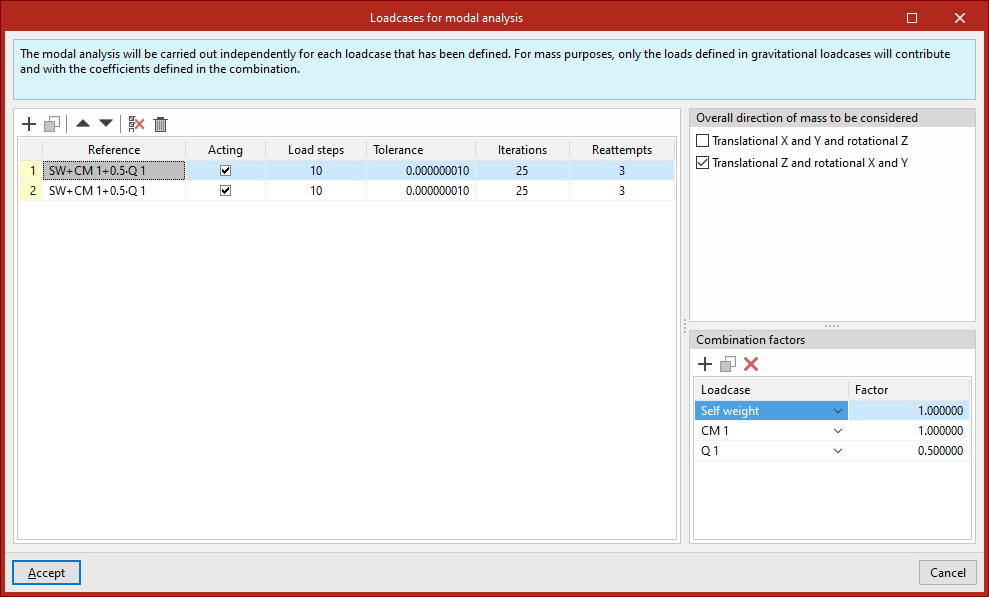
Clicking this opens the "Loadcases for modal analysis" window. These load cases must be added to the list on the left using the options on the top toolbar. Each case is defined as follows:
- The "Reference" is generated automatically based on the loadcases and combination factors defined below;
- Indicate whether the case is "Active" or not by ticking the relevant box;
- The number of "Load steps", the "Tolerance" value, the number of "Iterations" used in the analysis, and the number of "Reattempts" are defined.
Next, on the right-hand side, for each loadcase entered in the list, you must define the following:
- The "Overall direction of mass to be considered" is specified as follows:
- "Translational X and Y and rotational Z"
- and/or "Translational Z and rotational X and Y";
- At the bottom, the "Combination factors" are defined by entering the value for the "Factor" for each "Loadcase" of the model selected from the drop-down menu.
| Note: |
|---|
| Modal vibration analysis is performed separately for each of the load cases defined in this dialogue box. For mass purposes, only the loads defined in gravity load cases will be taken into account, and they will be applied using the coefficients defined in the combination. |
