Configuring general foundation data
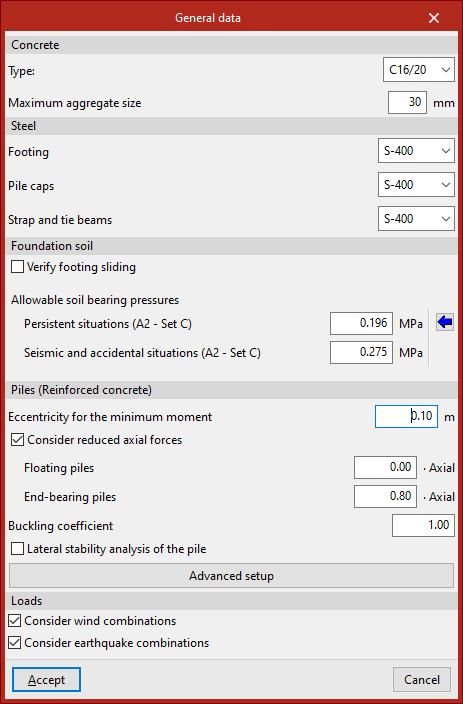
To review the general foundation settings in the program, go to the "Foundation" tab and select the "General data" option in the "Project" section at the top of the interface.

Material settings
Firstly, the data relating to the materials used in the foundation elements are defined:
- In "Concrete", the "Type" of concrete and the "Maximum aggregate size" are specified.
- Next, the type of "Steel" used for "Footings", "Pile caps" and "Strap and tie beams" is specified by selecting it from the various drop-down menus.
The materials available depend on the code selected.
Terrain settings
In the "Foundation soil" section, you can tick the "Verify footing sliding" box to include a slippage check in the design and verification of the footings.
The resistance to sliding is calculated using the Mohr-Coulomb failure model, that is, as the sum of the product of the "Adhesion (a')" and the compressed surface area of the footing, plus the product of the compressive axial force and the tangent of the "Soil-footing friction angle (d')".
In the boxes on the right, the program allows you to enter the information required to carry out this check.
Next, the values of the allowable soil stresses are entered for both "Persistent situations" and "Seismic and accidental conditions", also referred to as design forces in some standards.
You can "Import usual project values" by clicking the button on the right.
| Note: |
|---|
| The allowable bearing pressures have already been reduced by a safety factor. Due to differences in this factor, the values proposed for allowable stress in seismic and accidental situations are higher than those specified for steady-state conditions. |
Designing reinforced concrete piles
In the "Piles (Reinforced concrete)" section, the following options and data relating to the calculation of reinforced concrete piles are configured:
- Eccentricity for the minimum moment
- Consider reduced axial forces (optional)
- Floating piles (reduction factor · Axial)
- End-bearing piles (reduction factor · Axial)
- Buckling coefficient
- Lateral stability analysis of the pile (optional)
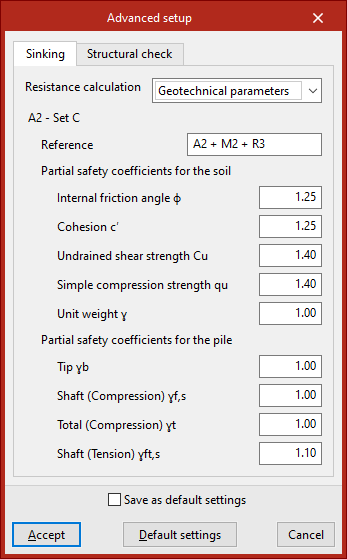
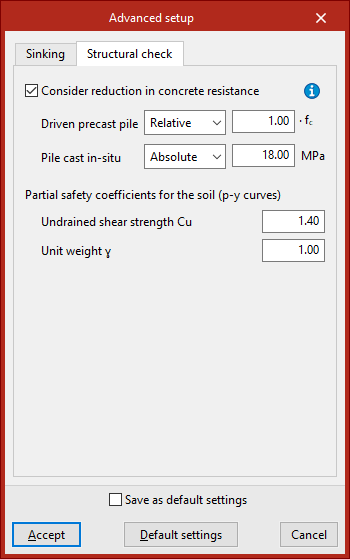
You can also access the "Advanced settings" panel, where the parameters used in the "Sinking" and "Structural analysis" checks are defined in their respective tabs.
Configuring the combinations of loads to be considered
Finally, in the "Loads" section, the program allows you to tick the "Consider wind combinations" and "Consider seismic combinations" boxes so that the foundation analysis takes into account design combinations involving wind or seismic loads, respectively.
Finally, to confirm the changes, click "Accept".