


Modal analysis: "Analysis" option
The modal vibration analysis is configured and run using the following option, available in the "Modal" section of the top toolbar, within the "Analysis" tab (under the "Structure" tab).

Analysis
The "Analysis" option allows you to run the modal analysis.
To do this, the combinations for the modal analysis must have been defined using the previous option in the group.
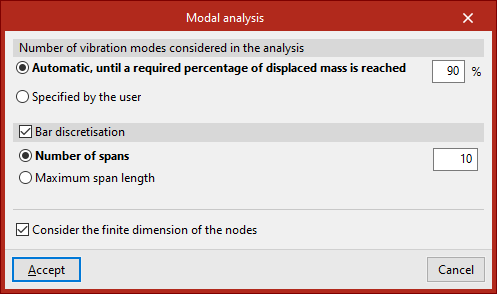
Clicking on this option opens the "Modal analysis" window, which allows you to configure the following options:
- The "Number of vibration modes considered in the analysis", which can be:
- "Automatic, until a required percentage of the mass has been displaced",
- or "User-specified".
- The program also allows you to enable "Bar discretisation" by ticking the relevant box. This can be defined as follows:
- specifying a "Number of sections",
- or by entering the value for "Maximum section length".
- Finally, you can "Take into account the finite dimension of the nodes" by selecting the last option.
The results of the modal analysis can be viewed using the two options in this section, "Vibration modes" and "Report", which will become available once this analysis has been completed.
