Options for configuring element references
From the "Numbering" group of the "Job" tab the element references (nodes, bars, parts and shells) can be configured according to the user's preference or to reset the numbering according to the current model data:

Edit numbering
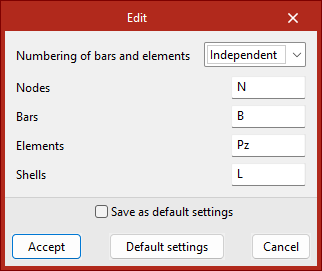
The "Edit" tool can be used to configure the numbering of the elements of the structure.
The "Numbering of bars and parts" drop-down list can set the numbering of bars and parts in two alternative ways:
- By nodes
The program automatically assigns the numbering of the bars and parts based on the numbering of the end nodes (e.g. N1/N2, N2/N3, N3/N4, etc.). - Independent
The program automatically assigns the numbering to the bars and pieces independently, regardless of the numbering of the end nodes (e.g. B1, B2, B3, etc.).
From this dialogue box, it is also possible to define the prefixes for the numbering of "Nodes", "Bars", "Parts" and "Shells", by default N, B, Pz and L. The field can be left empty if you do not wish to define a prefix.
| More information: |
|---|
| References to items already entered are maintained when deleting or adding new items. |
Reset numbering
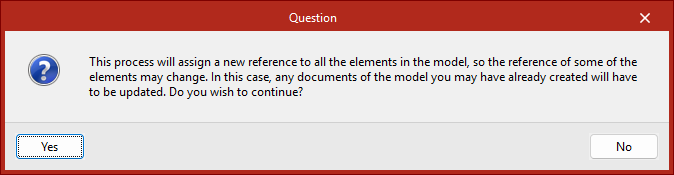
The "Reset" tool can be used to reset the numbering to the current model data. This can be useful if elements have been deleted and no jumps in the numbering are desired. The program will launch a warning informing you of the process to be carried out to confirm.
Assigning new references to elements may require revision and updating of documents already obtained from the model.