Configuring strap and tie beam options
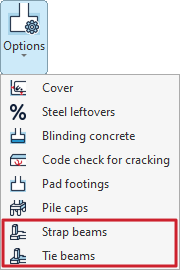
The configuration tools for strap and tying beams can be found in the "Options" menu within the "Project" section at the top of the interface, under the "Foundations" tab.

The options available for this configuration are as follows:
- Strap beams
- Tie beams
Each of these is detailed below.
Options for strap beams
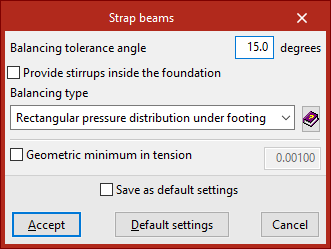
Firstly, the "Strap beams" option allows you to configure the properties of these elements.
The "Balancing tolerance angle" option is useful when the columns are not arranged in an orthogonal grid. If the strap beams near the corners of a foundation element are situated within the angle defined in this section, they will centre the bending moment of the adjacent face.
You can also select "Provide stirrups inside the foundation" to ensure that transverse reinforcement is placed in the section of the strap beams that lies within the foundation elements, such as footings.
Use the drop-down menu below to select the type of strap. This option allows you to select the type of force distribution acting beneath the footing as the ground response, for the purpose of analysing the forces on the strap beam.
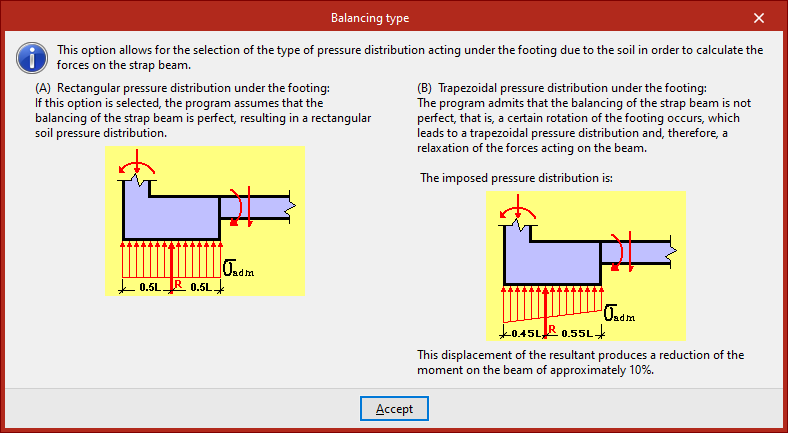
You can select either a "Rectangular pressure distribution under the footing" or a "Trapezoidal pressure distribution under footing". Clicking the button on the right will display detailed information about both options:
- In the case of the rectangular beam, it is assumed that the beam is perfectly centred.
- However, in the case of the trapezoidal law, it is recognised that the alignment is not perfect, which results in a certain amount of rotation in the bearing, a shift in the resultant force and a reduction in the stresses acting on the beam, thereby reducing the moment in the beam by a certain percentage.
Finally, by ticking the following box, you can apply "Geometric minimum in tension" requirements used in the design of strap beams. This prevents symmetrical reinforcement when footings are centred using deep beams.
To apply the changes, click "Accept".
Options for tie beams
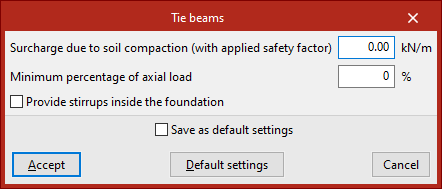
The "Tie beams" option in the "Options" submenu allows you to modify the properties of these elements.
The first two options in the pop-up window apply to tie beams as well as strap beams.
Firstly, an "Surcharge due to soil compaction (with applied safety factor)" may be considered, which may occur when the beam is constructed relatively close to the ground surface. This surcharge must be entered, increased by the safety factor estimated by the user. The program will not consider this load acting simultaneously with the tensile and compressive forces resulting from the earthquake.
The value defined under "Minimum percentage of axial load" is then used to analyse tension and compression elements. By default, this value is zero, and no axial force is applied.
If seismic actions have been defined automatically using the "With dynamic earthquake loading" option under "General data", the design acceleration is also analysed as a fraction of the gravitational acceleration, and the higher of the two values is then applied.
Finally, as with the strap beams, the last checkbox allows you to "Provide stirrups inside the foundation", so that transverse reinforcement is placed in the section of the tie beams that lies within the foundation elements, such as footings.
Once again, the changes are applied by clicking "Accept".