Performance options for non-linear analysis
The performance settings for non-linear analysis can be configured using the "Performance" option, available in the "Structure" group of the top toolbar, within the "Structure" tab (under the "Structure" section).

Performance
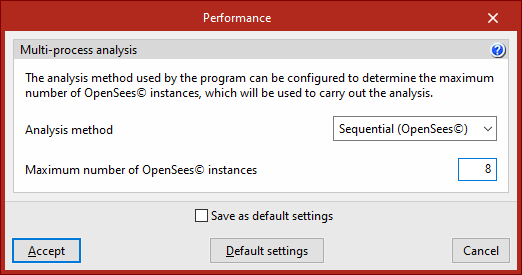
The program groups the load cases from the non-linear analysis into tasks, which it distributes across the different logical cores available on the computer to minimise the total model calculation time. Each task corresponds to an instance of OpenSees©.
Here, you can select the "Analysis method" that the program will use to determine the maximum number of OpenSees© instances to be used to perform the non-linear analysis. The method can be:
- Automatic:
The program will estimate the amount of RAM required to perform the stress analysis and, depending on the amount available, will launch as many instances of OpenSees© as possible, whilst attempting to avoid any deterioration in system performance. This is the recommended option. - Sequential (OpenSees©)
The program allows you to specify the "Maximum number of OpenSees instances" to be used to perform the analysis. Load cases are distributed evenly across each instance, which performs a sequential calculation of them. This option can be selected if you consider that the "Automatic" mode does not make adequate use of the computer’s resources or if you are experiencing problems with multi-processor analysis.