


Selecting and defining sections with batten plates
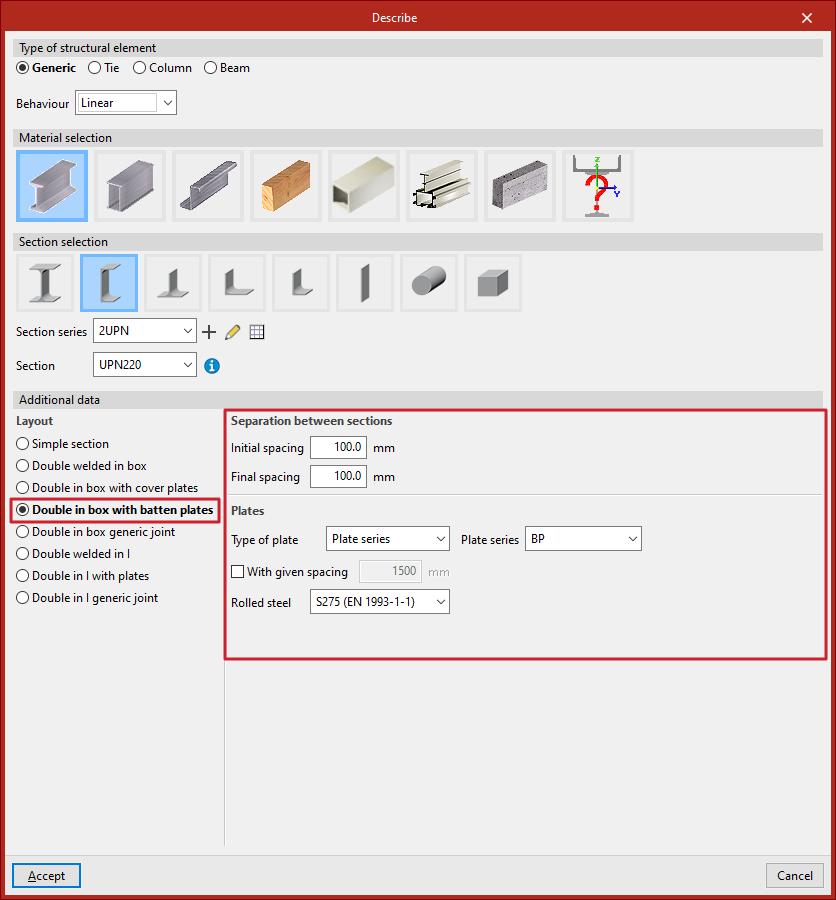
Sections with batten plates are selected and defined in the "Describe" window, which can be accessed when adding a new beam or via the "Section" option in the "Beams" group on the top toolbar of the "Geometry" tab (under the "Structure" tab).
The program allows you to use sections with plates in the following materials, sections and configurations:
- Rolled or welded steel section
- I beam
- Double in box with batten plates
- C section
- Double in box with batten plates, Double in I with plates
- I beam
- Cold-formed steel section
- Stiffened cold-formed C
- Double in box with batten plates, Double in I with plates
- Simple cold-formed C
- Double in box with batten plates, Double in I with plates
- Channel with stiffened web
- Double in box with batten plates, Double in I with plates
- Stiffened cold-formed C
In either case, you will need to specify the spacing between the sections and the details of the clips in the "Additional data" section:
Spacing between sections
In this section, you enter the "Initial spacing" and "Final spacing" between the sections. These values refer to the gap or separation distance between the closest faces of the sections at the start and end of the bar.
Batten plates
When specifying a connection using clips, the type of clip to be used, the cross-sectional area of each clip and the spacing between clips, as well as the material, must be specified:
- Type of plate
Allows you to choose from the following options to define the cross-section of the batten plate:- Generic plate
In this case, the program will calculate the entire geometry of the flange. - Plate series
In this case, the program allows you to select any of the rectangular rolled steel section series previously defined in the project (under "Rolled steel sections", "Plate") in order to position a specific bracket.
- Generic plate
- With given spacing (optional)
- If this option is enabled, the user specifies the distance between joints (or the centre-to-centre distance between batten plates). Depending on this distance and the selected design standard, the program will treat the section as a simple section, a composite section, or as separate bars if the maximum distance for it to be considered a composite section is exceeded.
- If this option is not selected, the program will calculate and assign the maximum distance between joints so that the structure can be treated as a composite section. This maximum distance depends on the selected design standard.
In the last drop-down menu, you must select the type of steel for the batten section.
The program will then allow you to view the data obtained from the analysis of the ties using the "Tie" option in the "Analysis" tab.
