Automatic sheet composition
The following option, within the "Edit" section of the top toolbar in the sheet editor, allows you to automatically generate a collection of drawings from a selection of sheets. Each drawing is inserted as a link to the content of the corresponding source sheet.

Sheet composition
This option allows you to automatically generate a set of links to other sheets.
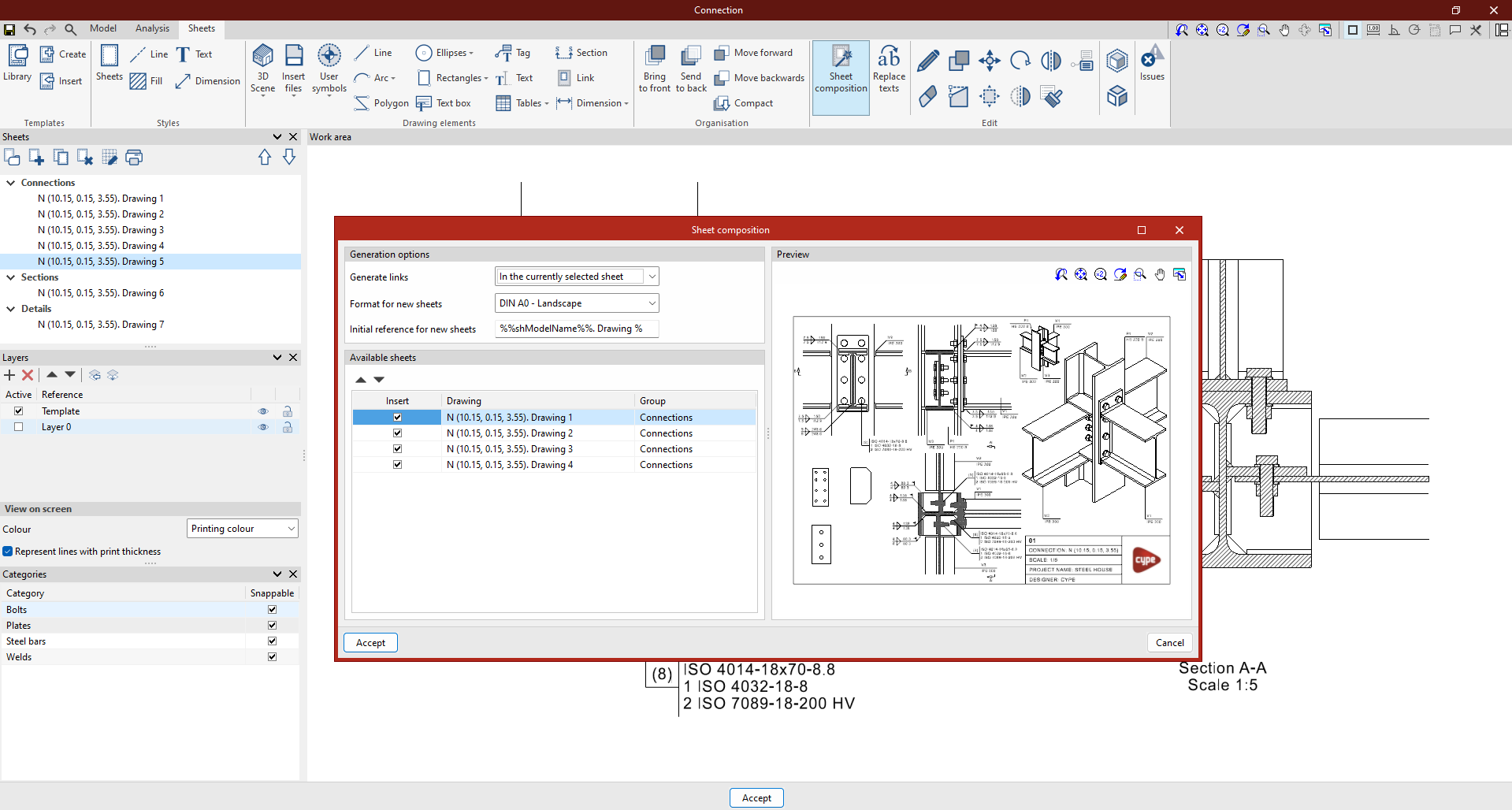
To do this, once you have clicked on the option, the "Sheet layout" window will appear, where you should do the following:
- Firstly, configure the "Generation options". To do this, you specify whether to "Generate links" "In the currently selected sheet" or "In a group of sheets". Next, specify the "Format for new sheets" and the "Initial reference for new sheets".
- The table below then shows a list of the "Available sheets" in the project, including the name of the "Model" displayed on each sheet, the "Name" of the sheet and the "Group" to which it belongs. Here, tick the boxes on the left to indicate which sheets you wish to "Insert" into the new layout.
- A "Preview" of each selected sheet is shown on the right.
Once you click "Accept", the program will generate links to the selected sheets and automatically arrange them on the drawing in a mosaic layout.