

Grouping and ungrouping connections
To group and ungroup connections, from the "Model" tab on the program's main interface, use the relevant options in the "Enter" section of the top toolbar.

A group of nodes will be assigned the same connection. The connection assigned to a group of nodes will read the bar forces for all nodes in that group from the BIM project. The combination filter applied via "Generate from the BIM model" is based on the sum of the combinations for all nodes.
Group
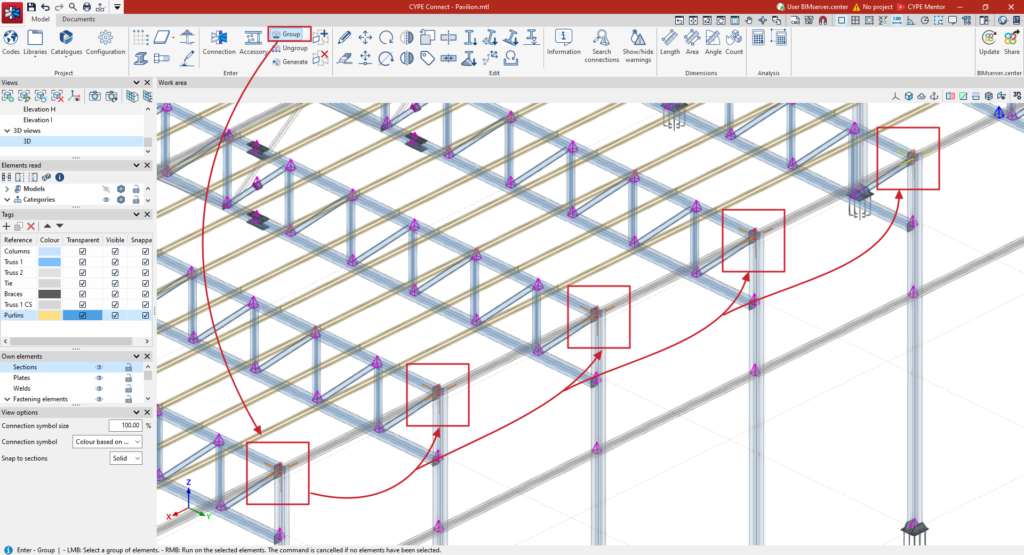
The "Group" option is used to group identical connections.
Once you have selected this option, when you hover the pointer over a connection, all those that are identical and belong to the same group will be highlighted in blue. When you left-click, the group is selected and its colour changes to orange.
You can then select other connections with the same characteristics, which will be highlighted in yellow. To add them to the group of connections, left-click on them and then right-click to confirm.
Ungroup
The "Ungroup" option allows you to ungroup previously grouped connections. To do this, left-click on the connection you wish to remove from the group. Then, confirm by right-clicking.
