List of sheets
The list of sheets is managed in the "Documents" tab of the program’s main interface by clicking on the "Lists" option in the "Sheets" section of the top toolbar.

List
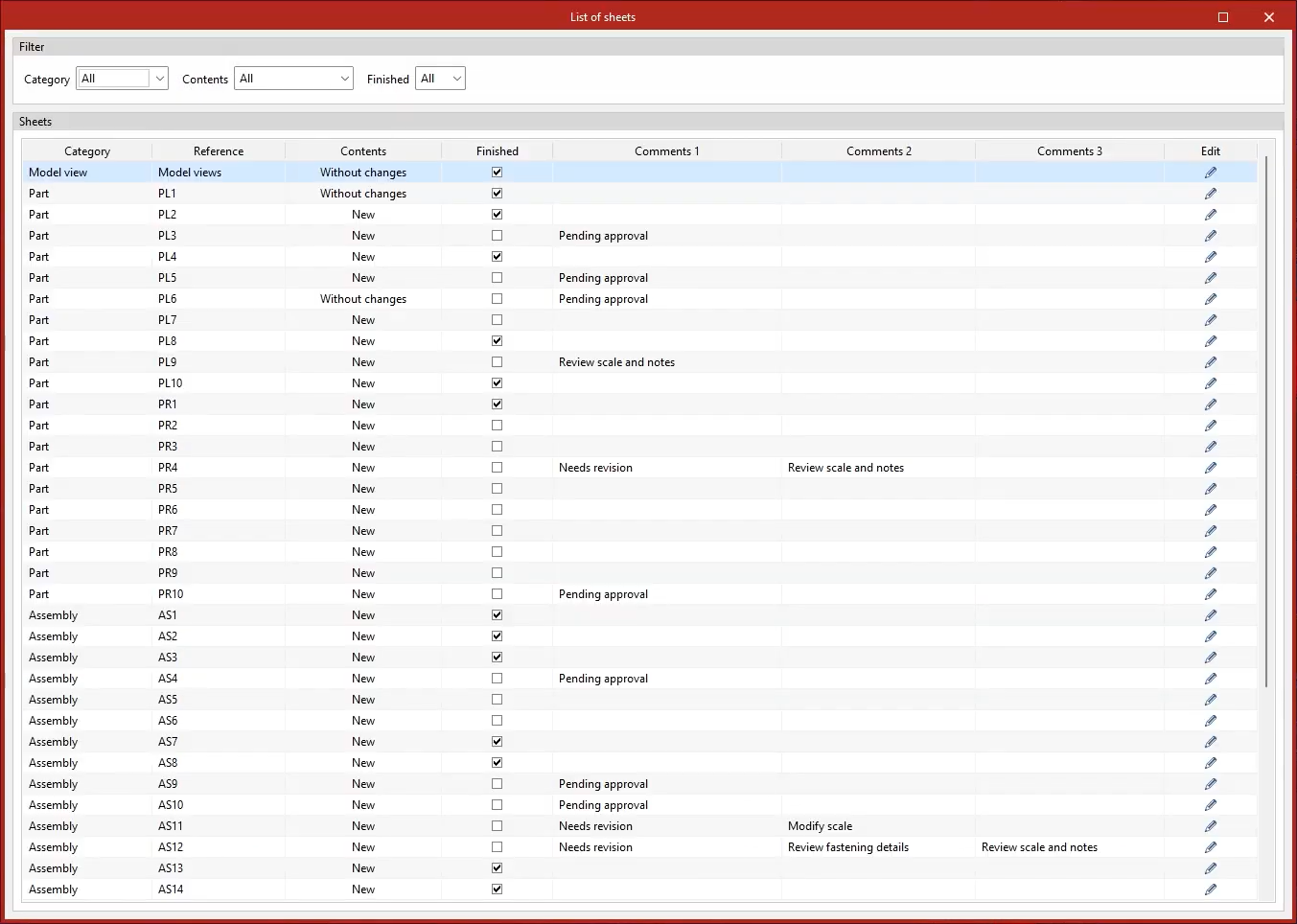
Clicking on this option opens the "List of sheets" window, which displays a list of all the sheets in the structure.
At the top, you can apply "Filters" to the list of drawings by "Category", if you wish to view only drawings for "Parts", "Assemblies", "Joints" or "Model views"; by their "Content" type, whether "New", "Duplicate", "Modified" or "Unchanged"; and by their completion status.
Next, the "Sheets" list shows the "Category" of each sheet, its "Reference" and the type of "Content".
The checkbox in the "Completed" column can be selected to mark each drawing as completed when appropriate.
The "Comment 1", "Comment 2" and "Comment 3" columns allow you to add notes or comments to each sheet.
Finally, from the list, you can access the content of each sheet by clicking on the "Edit" button in the right-hand column. This opens the editing interface for each sheet, allowing you to work on it directly.