
Checking the analysis results
In the "Results" panel, to the right of the "Loads" section, which can be accessed from the top of the interface, you can view the results of the analysis carried out on the defined cross-section.
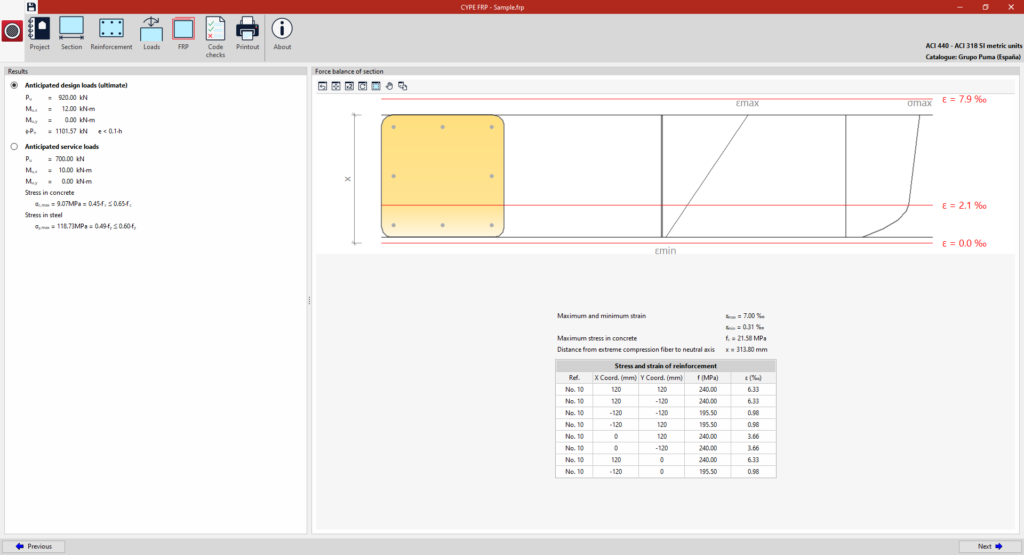
Example: checking the cross-section of a column (analysis in accordance with ACI 440 – ACI 318)
The "Verification" section displays:
- On the left, the "Results" obtained from the analysis, for both the "Anticipated design loads (ultimate)" and the "Anticipated service loads", including axial forces and moments, concrete stress and steel stress.
- On the right, the "Force balance of section" diagram for the selected loads, showing the cross-section layout and reinforcement, along with the strain and stress graphs. Shown are the "Maximum and minimum strain", the "Maximum stress in concrete", and a table showing the "Stress and strain of reinforcement", including the reference number of each bar and its X and Y position coordinates within the cross-section.