
Defining the section
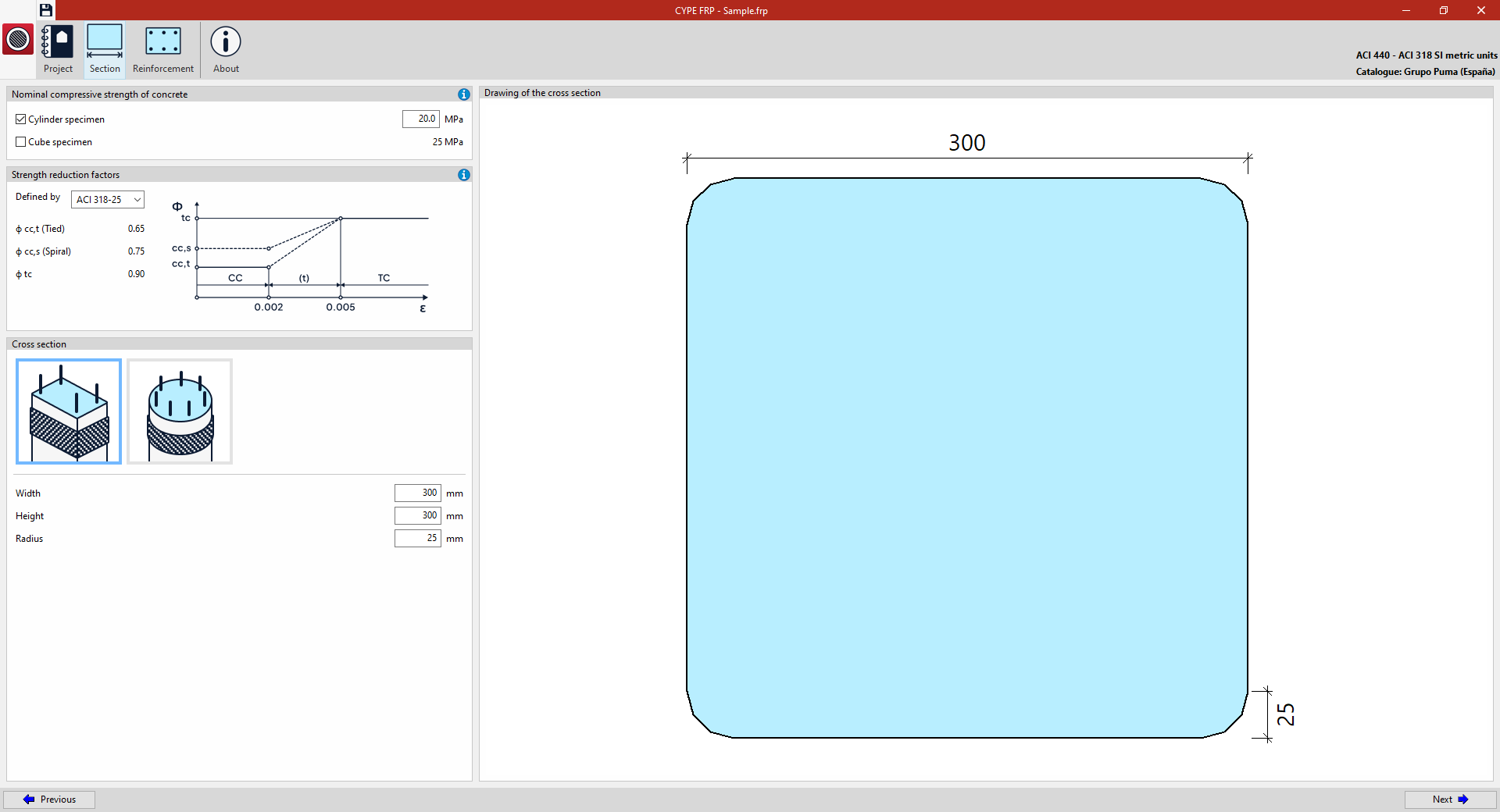
In "Section", accessible from the top of the interface, you can define the material and geometry of the section of the reinforced concrete member to be analysed.
Example: defining the cross-section of a column (analysis in accordance with ACI 440 – ACI 318)
The following details are defined in the "Section" tab:
- Nominal compressive strength of concrete
Calculations shall be carried out in accordance with the compressive strength determined using a "Cylinder specimen". However, you may specify the strength based on a "Cube specimen" by ticking the relevant box.
- Strength reduction factors
These can be "Defined by" "ACI 318-25", in which case the program applies them automatically, or entered directly by the "User". In this case, the following factors are specified:- ϕ cc,t (Tied)
- ϕ cc,s (Spiral)
- ϕ tc
- Cross-section
Specify whether it is a "Rectangular section" (stating the "Width", "Height" and "Radius") or a "Circular section" (stating the "Diameter").
On the right, the defined "Drawing of the cross section" is displayed.