Calculation conditions
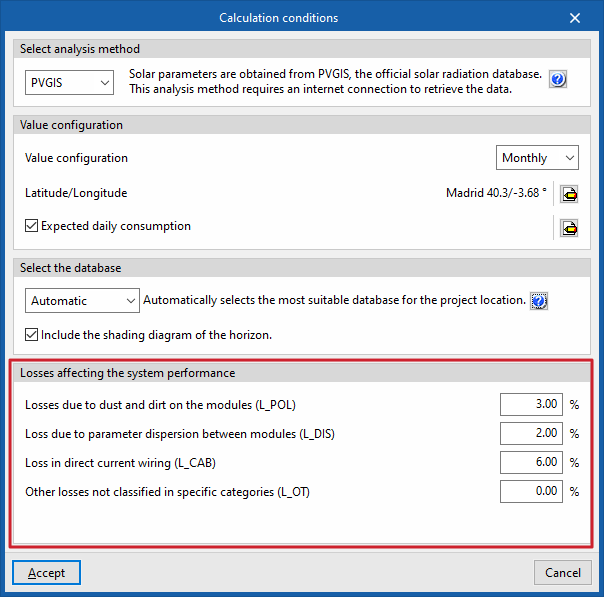
The system calculation parameters are entered via the "Calculation conditions" button, which can be found in the "Project" section of the top bar on the "Photovoltaic installation" tab.

This panel offers the following options:
Select analysis method
The analysis method used by the program to determine the installations’s energy output can be selected from the following:
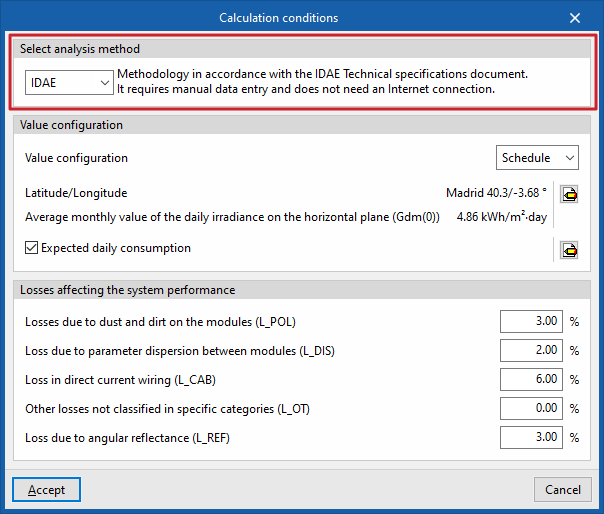
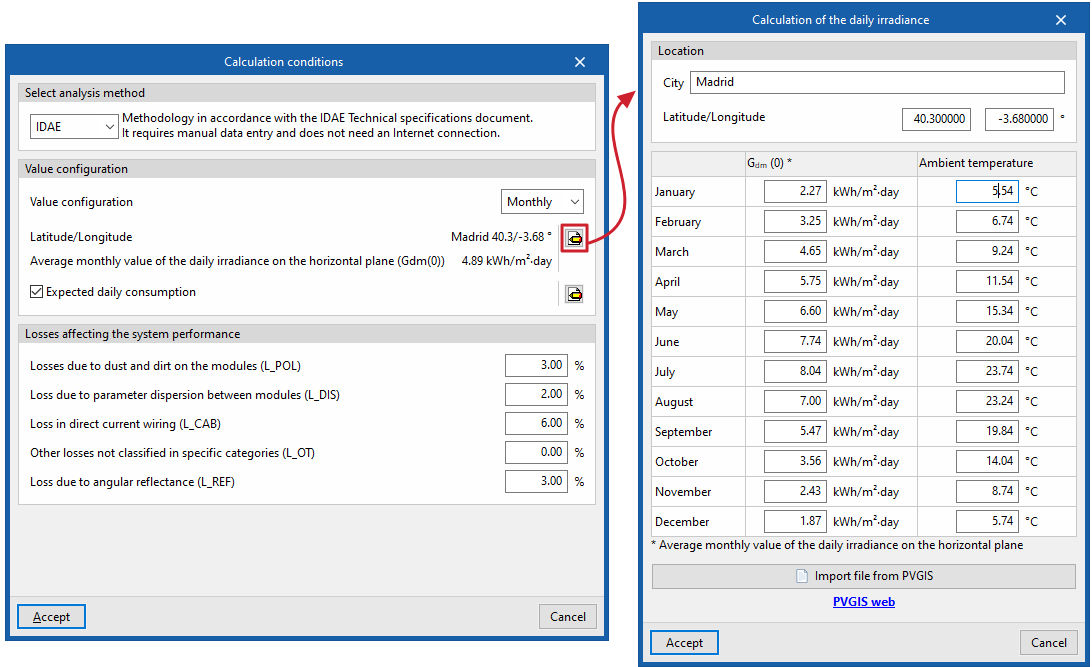
IDAE
The program uses the methodology set out inthe IDAE’s Technical Specifications (PCT). It requires data to be entered manually and does not require an internet connection.
| Note: |
|---|
| This analysis method has a number of limitations, as it only provides reliable results when the solar collectors are tilted and oriented within a specific range. This means that the user must position the collectors in a specific way (for example, they must never be arranged in the same plane as the building, as this method does not provide accurate estimates under such conditions). |
PVGIS
Solar parameters are obtained directly from PVGIS (Photovoltaic Geographical Information System), the official solar radiation database, which eliminates the need for manual entry, reduces the risk of errors, speeds up the process and makes the calculation more accurate. This calculation method requires an internet connection to retrieve the data.
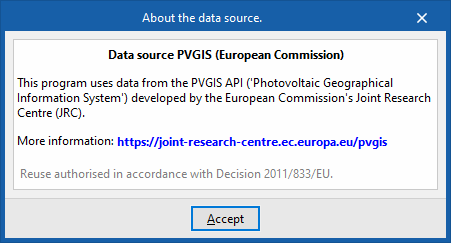
As for the source of this data, the program incorporates information from the PVGIS API developed by the European Commission’s Joint Research Centre (JRC). Further information can be found via this link.
| Note: |
|---|
| This calculation method allows calculations to be performed for any inclination and orientation, without the restrictions associated with the IDAE’s PCT-based calculation method. |
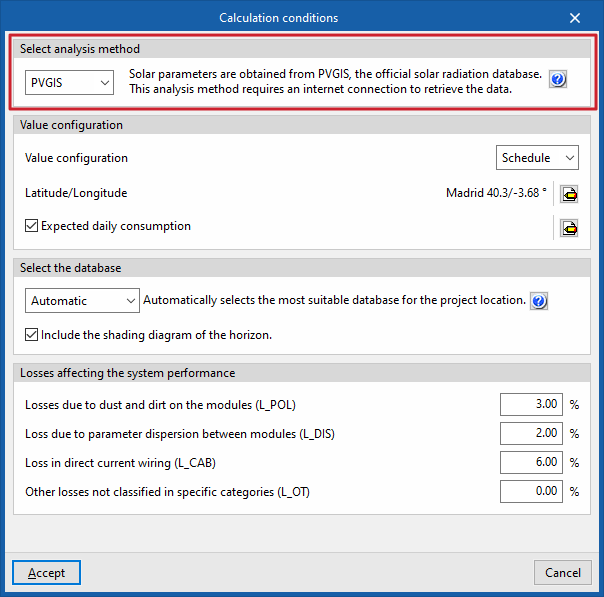
Setting values
In this section, you can configure the following settings:
- Value settings
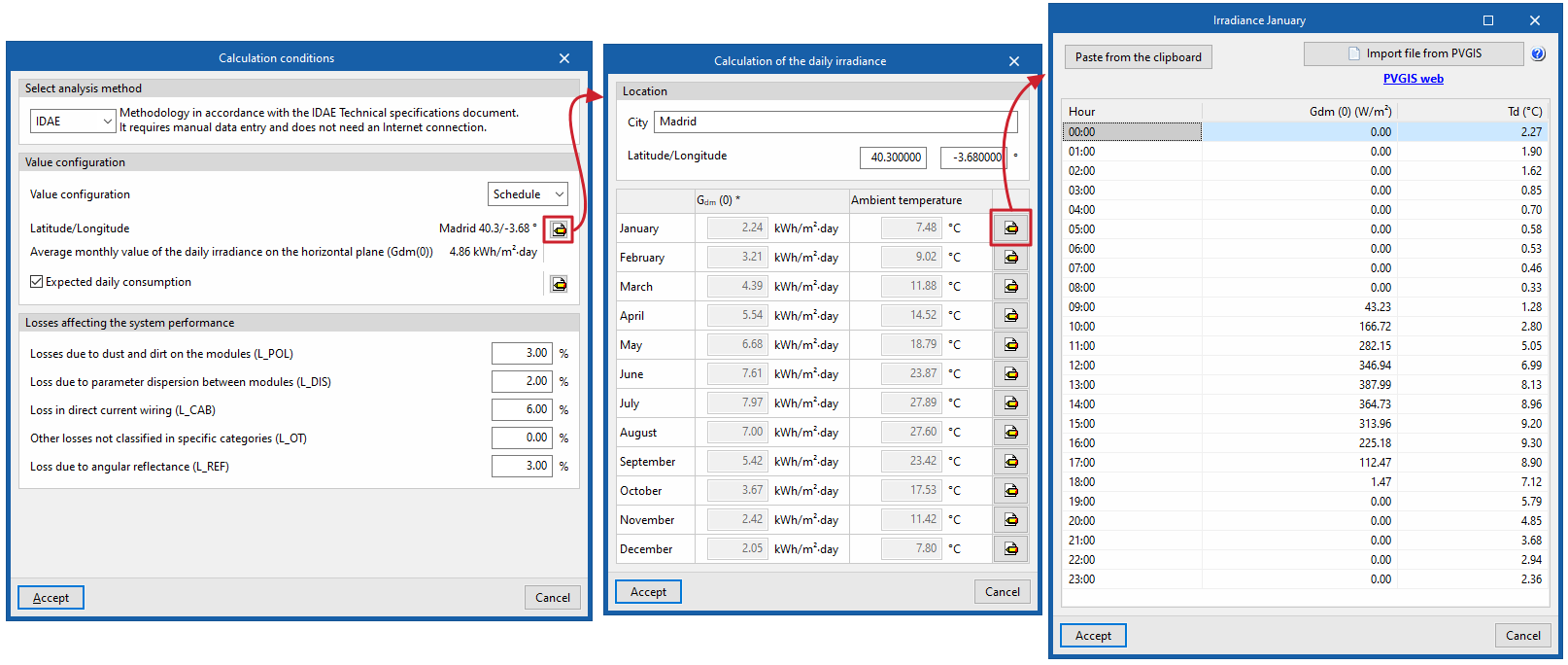
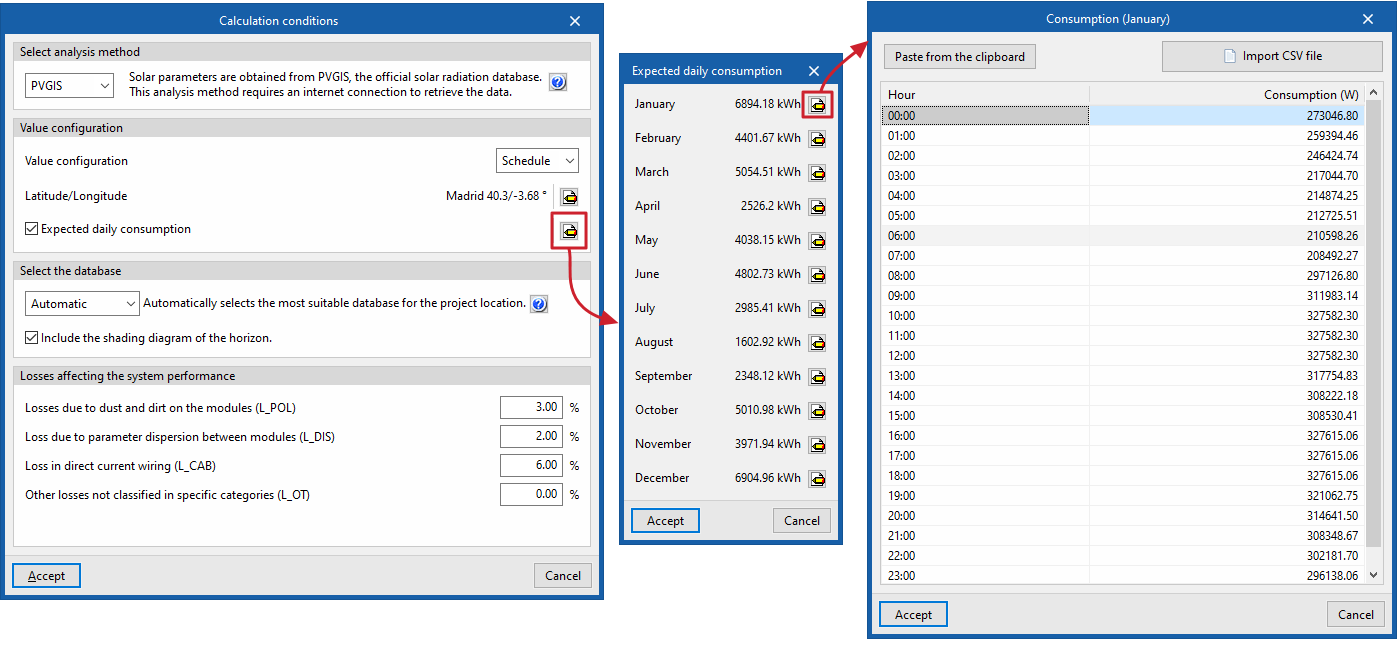
This drop-down menu allows you to select whether to use hourly irradiance values or total monthly irradiance values on the horizontal plane:- Timetable / Monthly
- Latitude/Longitude
This allows you to specify the project’s “Location”, entering the “Town/City” and its “Latitude/Longitude”.
Furthermore, if the "IDAE" calculation method has been selected, the irradiation or irradiance data must be entered here. To do this:- If you are working with monthly values, you must enter the monthly average value for daily irradiance on the horizontal plane ("Gdm (0)", in kWh/m²·day) and the "Ambient temperature" (in °C) for each month.
- If you are working with hourly values, you must enter the irradiance value ("Gdm (0)", in W/m²) and the temperature value ("Td", in °C) for each hour of the day in every month of the year.
- In both cases, you can import this information from a PVGIS file using the "Import PVGIS file" button, following the steps described at this link.
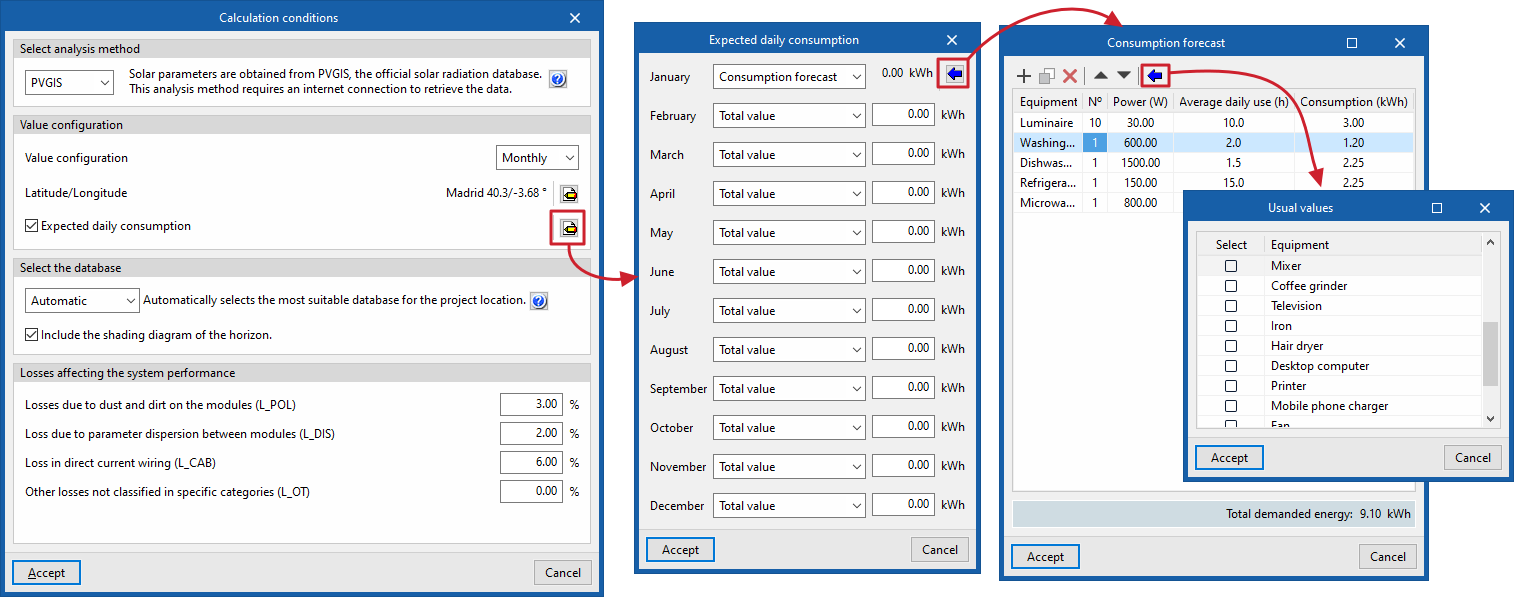
- Estimated daily consumption (optional)
If this option is enabled, you can enter consumption figures, if available.
To do so:- If you are working with hourly values, you must enter the "Consumption" value for each "Hour" in each "Month". The program allows you to paste these values from the clipboard or import them from an external file (using "Import CSV file").
- If you are working with monthly figures, you must enter the total "Consumption" figure for each "Month". The program allows you to enter the "Total value" for each month directly or, using the "Consumption forecast" option, to define a list of appliances with the reference data for each "Appliance", its number, "Power (W)", the "Average daily usage (h)" and its "Consumption (kWh)", thereby obtaining the "Total energy demand". The program offers a feature to "Import standard values" based on various predefined devices.
Select the database
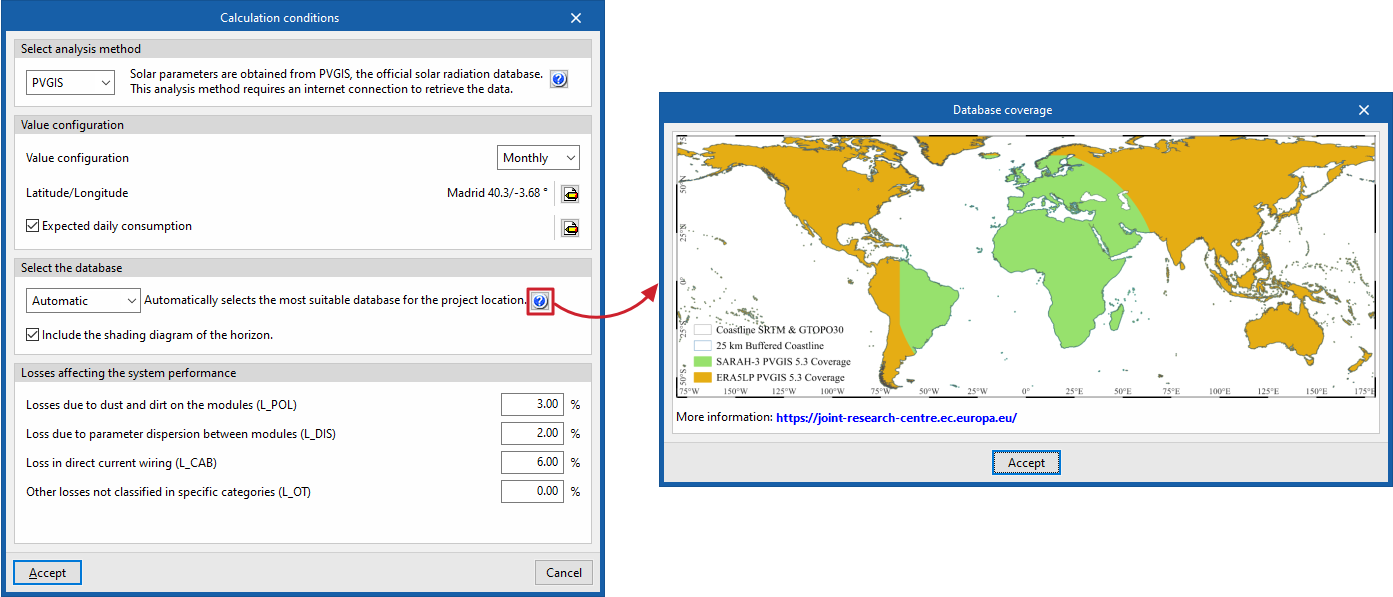
This section appears if the "PVGIS" calculation method has been selected; here, you can select the database to be used in the project as follows:
- Automatic
If this option is selected, the program automatically selects the most suitable database for the project location. - PVGIS-SARAH3
The program will use this satellite database, which is set as the default in PVGIS. - PVGIS-ERA5
The program will use this climate reanalysis dataset for areas without satellite coverage.
The map showing the satellite coverage for each available database (both PVGIS-SARAH-3 and PVGIS-ERA5) can be viewed by clicking the help button on the right ("Database coverage"), allowing you to visually identify which database covers the project site.
Optionally, you can also "Include the horizon shadow profile" by ticking the relevant box.
Losses that affect the installation's performance
In this section, you can configure the percentages associated with the following losses to be applied to the system’s output:
- Losses due to dust and dirt on the modules (L_POL)
- Losses due to parameter dispersion between modules (L_DIS)
- Losses in direct current wiring (L_CAB)
- Other losses not classified in specific categories (L_OT)
| Note: |
|---|
| Furthermore, depending on the geometric configuration of the photovoltaic modules entered, the program calculates losses due to orientation and tilt. Shading losses are calculated based on the shadows cast by the architectural elements of the linked project, the solar panels themselves, nearby buildings and other obstacles in the surrounding area. |