Checking the reinforcement layout in piles according to CIRSOC 103
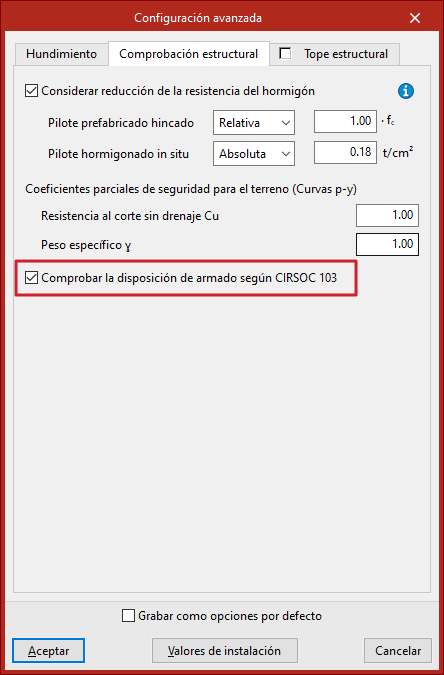
The check of the reinforcement layout according to CIRSOC 103 in piles is configured as follows:
- in CYPECAD, in the "General data" window, under the "Foundation elements with external connection" button, next to the "Foundation" drop-down menu in the "Concrete" section;
- and in CYPE 3D, in the "Piles (reinforced concrete)" section of the "General data" window;
- then, in the "Piles (Reinforced concrete)" section, click on "Advanced configuration" and open the "Structural check" tab.
Here you will find the checkbox "Check the reinforcement layout according to CIRSOC 103".
If this box is checked, the specific reinforcement layout checks for piles are performed only according to the Argentine seismic standard CIRSOC 103, instead of using the criteria indicated in the concrete standard, regardless of whether seismic calculation is enabled for the project or not.
If it remains deactivated, the programme checks the reinforcement layout according to the concrete standard for compressed elements and, additionally, if seismic calculation is activated for the project, the criteria of the CIRSOC 103 standard will also be checked.