Designing foundation elements
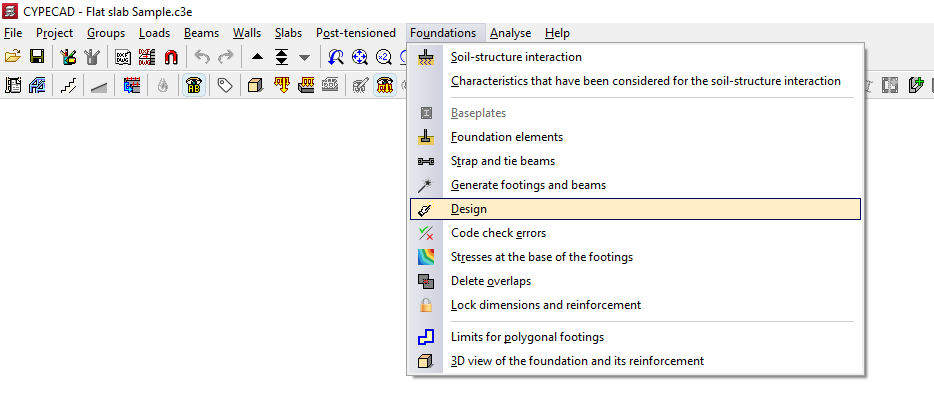
The "Design" option, available in the "Foundation" menu on the “Beam input” or “Results” tabs, allows you to simultaneously design the elements that make up the foundation, including both their geometry and reinforcement.
This option will be available when you are in a group containing foundation elements such as footings, pile caps, centring beams or tie beams. To move to the desired group, use the options “Move up group”, “Go to group” and “Move down group”.
In order to carry out the foundation design, the structure must be designed in such a way that stresses are present at its base. If this is not the case, no stresses will be transferred to the foundation, meaning that the results obtained correspond to the minimum dimensions of the elements. The programme will display a dialogue box informing the user of this situation, so that the user can indicate whether or not they wish to continue.
Options in the "Design" window
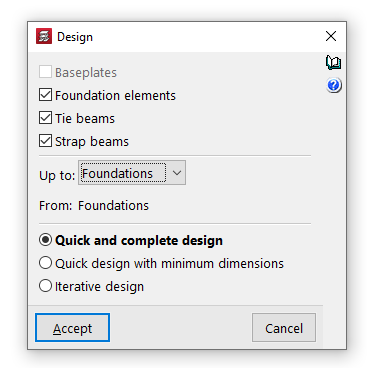
In the pop-up window that appears when you click on this option, you can tick the boxes for "Baseplates", "Foundation elements", "Strap beams" and "Tie beams" to specify the elements you wish to design.
Further on, in the drop-down menus "Up to" and "From", you select the floor groups for which you wish to analyse the foundation dimensions.
Next, the type of design to be carried out is specified.
- In the case of a "Quick and complete design", all foundation elements are sized in a single step, without taking into account the geometry entered by the user.
- If "Quick design with minimum dimensions" is selected, this is also performed once only; in this case, the dimensions entered by the user are checked and modified only if necessary.
- Finally, selecting "Iterative design" carries out the design of all foundation elements over three iterations, as any change in the stiffness of a strap beam affects the analysis of the footings to which it is connected.
Clicking "Accept" starts the design process. Once this is complete, you can use the "Check errors" option in the "Foundations" menu and select each element to view a detailed list of checks.