


Inserting, editing and generating drop panels
The "Drop panels" option, within the "Enter panel" window (accessible via "Panels > Panel manager”), opens a menu with various options for entering, editing and automatically generating drop panels in waffle slabs (defined as such under “Enter panel > Drop panels”).

They are as follows:
- Configuration of drop panel generation
- Generate drop panels
- Enter drop panels
If tables have been entered or generated in the floor plan, the following options are available:
- Move corners
- Delete a drop panel
- Delete drop panels of a slab
- Delete all drop panels

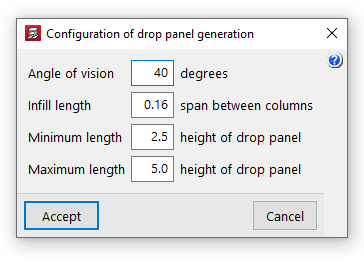
Configuration of drop panel generation
This option allows you to configure the following settings for the automatic generation of drop panels:
- Angle of vision
The program generates two views in the directions of the mesh passing through each column centre. For each view, an angle of vision is then set, the value of which is specified in this option (ranging from 10 to 60 degrees; the default is 40 degrees). From then on:- If another column falls within the field of view, the distance to that column will be used as the reference distance for generating the table.
- If there are several columns within the angle, the nearest one will be selected.
- If there are no columns within the angle, the drop panel shall be designed to the "Minimum length".
- Solid section length
The dimension of the drop panel in each direction corresponds to the length of the solid section, measured from the face of the column to the outer edge of the drop panel. This length is calculated as a percentage of the distance between the column in question and the nearest column within the angle of view. This value ranges between 0.10 and 0.30 (default: 0.16) of the span between piers. - Minimum length
The minimum length of the drop panel is used when there is no other column within the field of view; it is measured from the face of the column to the outer edge of the drop panels, relative to the edge of the drop panels. This value must be between 1 and 3 (default: 2.5) times the height of the drop panel. - Maximum length
This value determines the maximum length of the drop panel and is measured from the face of the column to the outer edge of the drop panel, relative to the edge of the drop panel. This value must be between 3 and 6 (default: 5) times the height of the drop panel.
Generate drop panels
The "Generate drop panel" option automatically creates all the drop panels for the floor slabs on the floor plan in accordance with the defined "Configuration of drop panel generation".
New drop panels are only generated on columns that do not already have them; therefore, this option does not restore their original dimensions unless they are first removed using the relevant options.
The geometry of the generated drop panels can be edited later using the other options.

Enter drop panels
The "Enter drop panel values" option allows you to enter the drop panel value for a column by clicking on it.
If, instead of selecting a column, you click on another point on the slab, you can solidify an area of the slab by selecting the two corners of the rectangle that defines it.
| Note: |
|---|
| When defining the geometry of the drop panel, it is possible to solidify only a portion of the "Number of elements" used for lightening that make up the form (in permanent coffered slabs) or half form slab, if the slab has a "Half form available" (in removable form slabs). These options are available in the waffle slab editing panel. |

Move corners
The "Move corners" option allows you to modify the geometry of the drop panel.
To do this, select a corner of the drop panel, then move the corner to its new position, thereby simultaneously adjusting two sides of the drop panel’s edge.

Clear a drop panel
The "Delete a drop panel" option allows you to delete a drop panel by clicking on it.
If two or more drop panels are joined together, they must be removed one by one. If a drop panel is divided by a beam, each surface of the drop panel must be marked on each slab.
Clear the drop panel from the board
The "Delete drop panels of a slab" option allows you to simultaneously remove all drop panels from the waffle slab selected on the floor plan, defined as a closed outline bounded by beams.
Clear all drop panels
The "Delete all drop panels" option removes all drop panels from the waffle slabs on the current floor.

