Tools for managing manufacturers' catalogues
In the "Project" section of the main toolbar, you will find the options for managing manufacturer product catalogues so that they can be added to the project:

Catalogues
Downloads manufacturers’ catalogues via the connection to the Open BIM Database, making it easier to enter data into the program for project development.
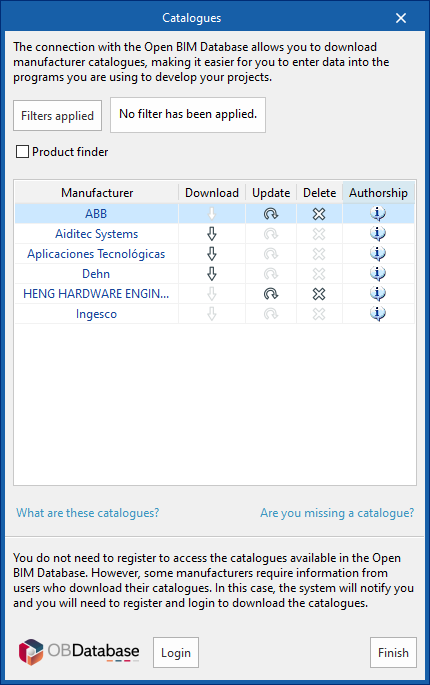
Clicking on this option opens a window showing the available manufacturer catalogues.
Download catalogues
The following options are displayed for each manufacturer:
- Download
Download the manufacturer’s catalogue. The products in the catalogue will be available in the project. - Update
Updates the catalogue for the selected manufacturer to the latest version, deleting the version previously downloaded to the project. - Delete
Deletes the selected manufacturer's catalogue. The products in the catalogue will no longer be available in the project.
Connection to the Open BIM Database
At the bottom of this dialogue box, the program allows you to log in using an Open BIM Database username and password.
| Note: |
|---|
| Products from the downloaded catalogues can be selected when adding components to the lightning protection system, such as early streamer emission lightning conductor (ESE), conductors or test link boxes. |