Entering and assigning receivers
The "Electric loads and circuits" group in the main toolbar contains the tools for entering and assigning receivers:

Receivers
Freely inserts receivers into the model.
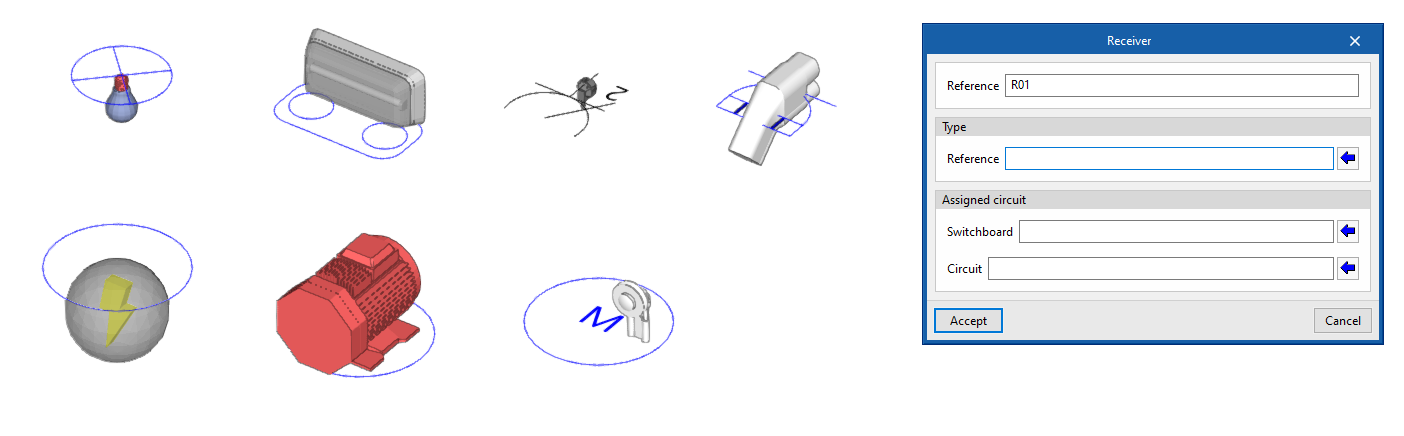
First, the options displayed in the menu can be used to select the type of receiver from among the following:
- Lighting
- Emergency
- Electrical outlet
- Motor
- Lifting device
- Electric vehicle recharging
- Generic
The following parameters must then be entered, which indicate the reference and type of receiver, as well as the switchboard and circuit it belongs to:
- Reference
Receiver reference. - Type of receiver
Selects one of the types of receivers created from the corresponding option in the "Project" group. - Switchboard
Selects one of the previously entered switchboards. - Circuit
Selects one of the circuits associated with the switchboard indicated in the previous field.
Assign
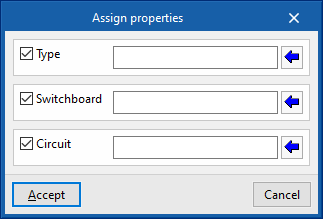
Assigns the following properties to the selected receivers:
- Type of receiver (optional)
Selects one of the types of receivers created from the corresponding option in the "Project" group. - Switchboard (optional)
Selects one of the previously entered switchboards. - Circuit (optional)
Selects one of the circuits associated with the switchboard indicated in the previous field.
This option allows mass modification of the properties of the desired receivers without the need to edit them one by one.